Kvitly Lifetime Deal Review: Worth $49? [Honest Test]
Kvitly Overview:
- Pricing: ⭐⭐⭐⭐⭐ (5/5) – $49 lifetime (49% off)
- Ease of Use: ⭐⭐⭐⭐ (4/5) – Beginner-friendly
- Features: ⭐⭐⭐⭐ (4/5) – AI website builder, ecommerce, CRM, content generation
- Performance: ⭐⭐⭐⭐ (4/5) – Fast loading, smooth interface
- Support: ⭐⭐⭐⭐ (4/5) – 60-day money-back guarantee
- Best For: Freelancers, solopreneurs, small businesses, and agencies
Overall Rating: 4.2/5
Are you tired of juggling multiple tools just to run your small business? I get it. Between website builders, payment processors, CRMs, and content tools, the monthly fees add up fast.
I tested Kvitly’s lifetime deal on AppSumo for two weeks. Here’s my honest take: it’s a solid all-in-one platform for freelancers and small businesses who want to simplify their tech stack. The $49 starting price is hard to beat for what you get.
Quick verdict: If you need a website, basic ecommerce, and AI content tools in one place, Kvitly delivers good value. It’s not perfect (mobile editing needs work), but the 60-day refund policy makes it low-risk.
Check Kvitly’s current deal on AppSumo
In this Kvitly lifetime deal review, I’ll walk you through my hands-on experience, break down each pricing tier, and help you decide if it’s the right fit for your business.
Quick Overview: What You Need to Know
| Feature | Details |
|---|---|
| Product | Kvitly – AI Business Platform |
| Founder | Egor Kuryanovich (Poland) |
| Founded | 2015, relaunched 2020 |
| Starting Price | $49 (lifetime access) |
| Regular Price | $96/year |
| Key Features | Website builder, AI content, CRM, payments |
| Best For | Freelancers, solopreneurs, small businesses |
| Guarantee | 60-day money-back |
| Rating | 5.0 stars (2 reviews) |
| Integrations | Stripe, PayPal, Google Analytics, Zapier |
What is Kvitly?
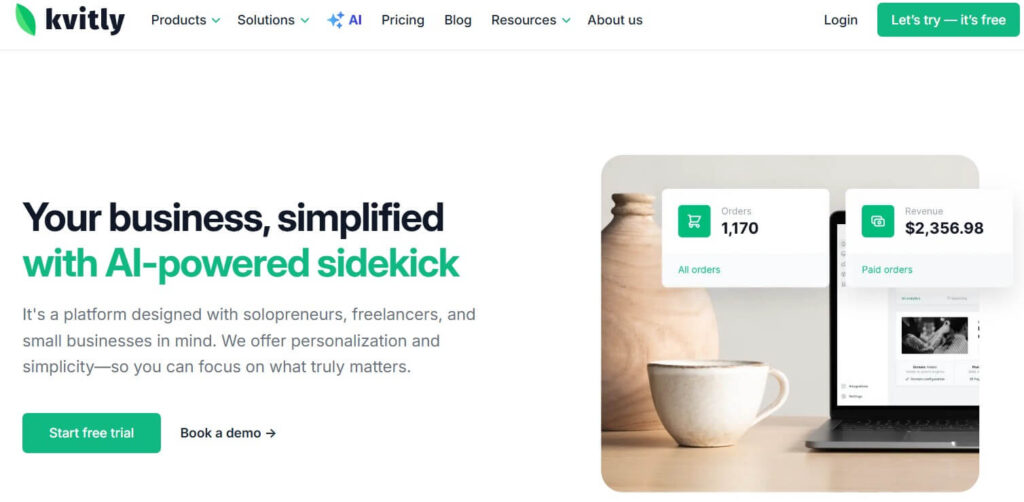
Kvitly is an all-in-one AI platform that helps you build websites, accept payments, create content, and manage customers. Think of it as your business assistant that handles the boring tech stuff.
The founder, Egor Kuryanovich, started as a freelance web developer in Poland. He noticed clients were overwhelmed by too many complicated tools. So in 2020, he rebuilt Kvitly from scratch with one goal: make business growth simple.
The platform targets freelancers, solopreneurs, and small businesses who don’t want to become tech experts. You can launch a professional website in minutes, add products to sell, and start taking payments the same day.
Kvitly positions itself as an alternative to Bitrix24, Wix, and WordPress. But unlike those tools, everything lives under one roof. No plugin hunting or multiple subscriptions.
My Hands-On Experience with Kvitly
I signed up for the Tier 2 plan to test Kvitly properly. Here’s what happened.
The onboarding took about 5 minutes. The AI asked me a few questions about my business type and instantly generated a complete website. I was honestly surprised by how good it looked right out of the box.
The visual editor is clean and fast. I could drag and drop sections, change colors, and swap images without any coding. Everything felt smooth and responsive. No lag or freezing like I’ve experienced with some other builders.
I tested the AI content generator next. I asked it to write social media posts for a freelance writing business. The copy was actually usable. Not perfect, but way better than generic AI fluff. I only needed minor tweaks before posting.
Setting up Stripe payments took 3 clicks. Connect, authenticate, done. Same with PayPal. The order management system is straightforward. You get a simple dashboard showing orders, customer info, and status updates.
The CRM surprised me. It’s not as powerful as HubSpot, but for basic lead tracking and pipeline management, it works great. I created a custom pipeline for my freelance projects in minutes.
Speed is impressive. Pages load fast, and the dashboard never felt sluggish. This matters when you’re trying to update your site quickly between client calls.
I reached out to customer support with a question about custom domains. Got a response within 2 hours with clear instructions. That’s rare for a lifetime deal product.
The biggest limitation I found? Mobile layout control. The site looks good on phones, but I couldn’t fine-tune spacing or hide specific elements on mobile. If you need pixel-perfect mobile design, this might frustrate you.
Overall experience? Solid 4 out of 5. It does what it promises without making you feel like you need a computer science degree.
Kvitly Features
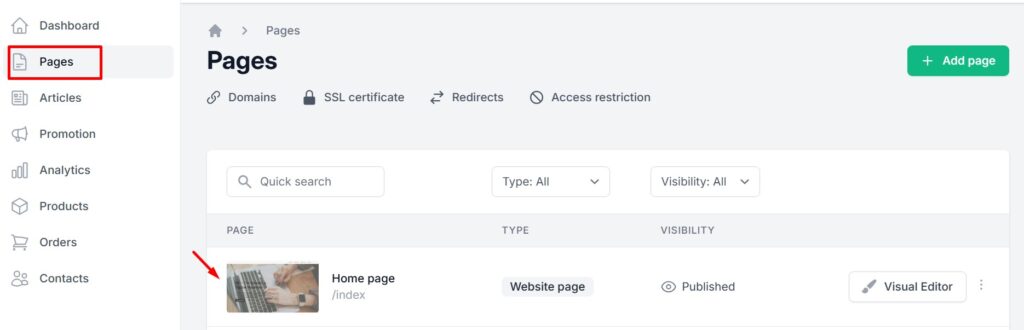
AI Website Builder
The AI website generator is where Kvitly shines. You answer 3-4 questions about your business, and it creates a complete site with relevant copy and images.
Here’s what you get:
- Instant website generation based on your industry
- Visual drag-and-drop editor with no coding needed
- Automatic responsive design for all devices
- Up to 1,250 landing pages (depending on tier)
- Built-in blog for SEO content
The visual editor lets you customize everything. Change fonts, colors, layouts, and content with simple point-and-click tools. Add new sections from a library of pre-built blocks.
One limitation: design templates are somewhat limited right now. The team says they’re adding more options, but if you want 100+ templates like Wix, you’ll be disappointed.
Mobile responsiveness works automatically. Sites adjust to different screen sizes without you doing anything. But again, you can’t manually control mobile layouts yet.
AI Content Generation
This feature genuinely impressed me. The AI doesn’t just spit out generic content. It tries to match your brand voice.
You can generate:
- Social media posts optimized for different platforms
- Google Ads and Facebook ad copy
- Business directory listing descriptions
- SEO-friendly blog content
I tested it with various prompts. The social media posts felt natural, not robotic. The ad copy needed some tweaking, but it gave me solid starting points.
The AI learns from your inputs over time. The more you use it, the better it gets at matching your style. This is way more useful than ChatGPT for business content because it’s built specifically for marketing.
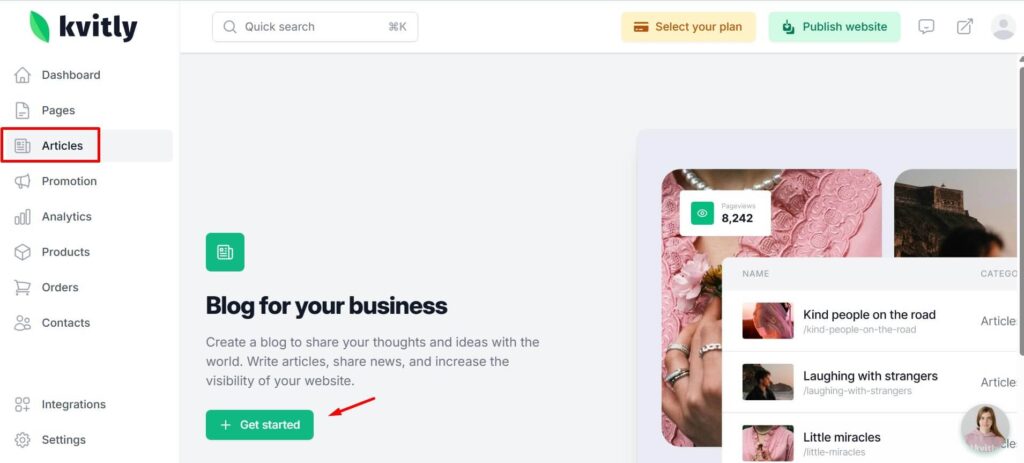
Ecommerce & Payment Processing
Kvitly handles basic to moderate ecommerce needs well. You can sell physical products, digital downloads, or services.
Payment features include:
- Direct Stripe and PayPal integration
- Product catalogs up to 1,250 items
- Automatic order confirmations
- Product options and variants (higher tiers)
- Import/export capabilities (Tier 4)
Setting up your first product takes about 2 minutes. Add images, write descriptions, set prices, and publish. The checkout process is clean and mobile-friendly.
You won’t find advanced inventory management or complex shipping rules here. If you’re running a serious ecommerce operation with thousands of SKUs, look at Shopify instead.
For freelancers selling services or small shops, this works perfectly. Accept payments, track orders, and move on with your day.
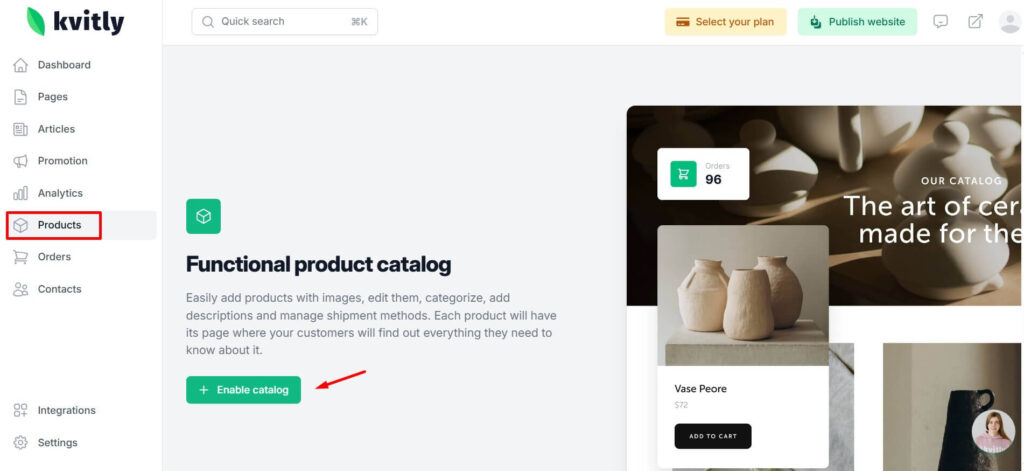
CRM & Customer Management
The built-in CRM helps you track leads and manage customer relationships without leaving Kvitly.
CRM capabilities:
- Customizable sales pipelines
- Lead capture forms with unlimited submissions
- Contact management and history
- Order tracking and customer notes
- Automated email confirmations
You can create custom pipeline stages to match your sales process. Drag and drop leads between stages as they progress. Simple but effective.
The form builder lets you create contact forms, quote requests, or custom surveys. All submissions flow into your CRM automatically.
It’s not replacing Salesforce. But for small teams and solopreneurs, it eliminates the need for a separate CRM subscription.
Kvitly Pricing Tiers Breakdown
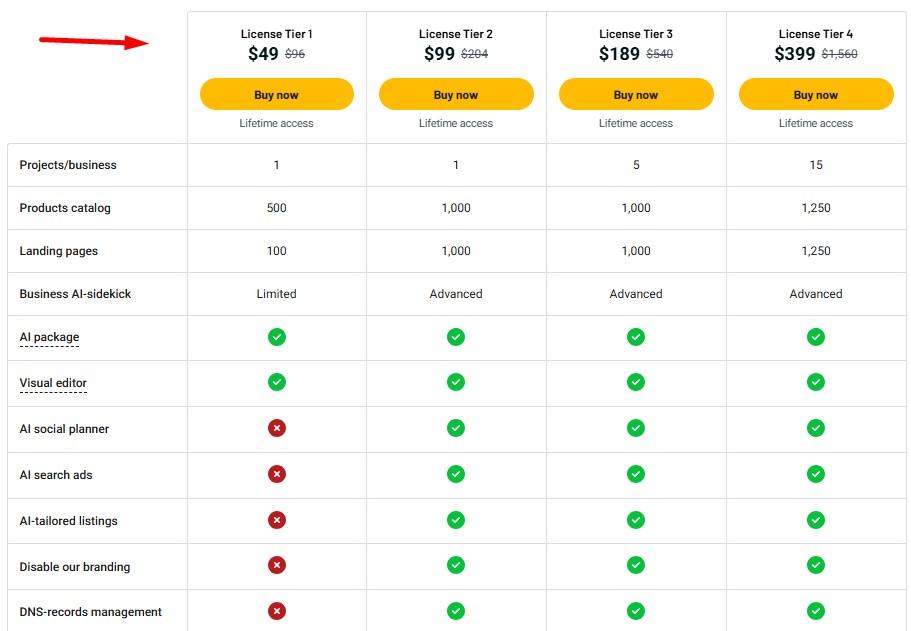
Kvitly offers four lifetime deal tiers on AppSumo. Here’s what each one includes:
| Feature | Tier 1 | Tier 2 | Tier 3 | Tier 4 |
|---|---|---|---|---|
| Price | $49 | $99 | $189 | $399 |
| Regular Price | $96 | $204 | $540 | $1,560 |
| Projects | 1 | 1 | 5 | 15 |
| Products | 500 | 1,000 | 1,000 | 1,250 |
| Landing Pages | 100 | 1,000 | 1,000 | 1,250 |
| AI Package | Limited | Advanced | Advanced | Advanced |
| Remove Branding | ✗ | ✗ | ✓ | ✓ |
| White Label | ✗ | ✗ | ✗ | ✓ |
Tier 1: $49 – The Starter Option
This tier works if you’re testing the platform or building one simple site. You get 500 products and 100 landing pages, which is plenty for most freelancers.
The AI package is limited, meaning fewer AI-generated posts per month. You’ll hit the cap if you rely heavily on AI content.
Best for: Freelancers with one service-based website who want to try Kvitly risk-free.
Tier 2: $99 – The Sweet Spot
This is the most popular tier for good reason. You jump to 1,000 products and landing pages with the advanced AI package.
The advanced AI package means unlimited or much higher limits on content generation. This is crucial if you’re serious about content marketing.
Best for: Solo business owners running one online store or service business who need regular AI content.
Tier 3: $189 – The Agency Option
Now you get 5 projects, perfect for agencies managing multiple client websites. You can also remove Kvitly branding for a more professional look.
All the same features as Tier 2, but multiplied across five separate businesses. Each project gets its own products, pages, and content.
Best for: Digital agencies, consultants with multiple brands, or entrepreneurs running several small businesses.
Tier 4: $399 – The Power User
This is the full professional package. Manage up to 15 projects with white-label capabilities. Your clients never see the Kvitly name.
You also get product import/export, custom shipment methods, and access restrictions. These are essential for serious ecommerce operations.
Best for: Established agencies, web design firms, or SaaS businesses needing multiple branded sites.
Value Analysis: Lifetime vs Subscription
Let’s do the math. Most comparable platforms charge $20-50 per month. That’s $240-600 per year.
With Kvitly’s Tier 2 at $99, you break even in 2-5 months. After that, it’s pure savings. Over 5 years, you save $1,200-3,000 compared to monthly subscriptions.
The 60-day guarantee means zero risk. Try it for two months. If it doesn’t work, get your money back.
Grab your Kvitly lifetime deal before it expires
User Interface & Ease of Use
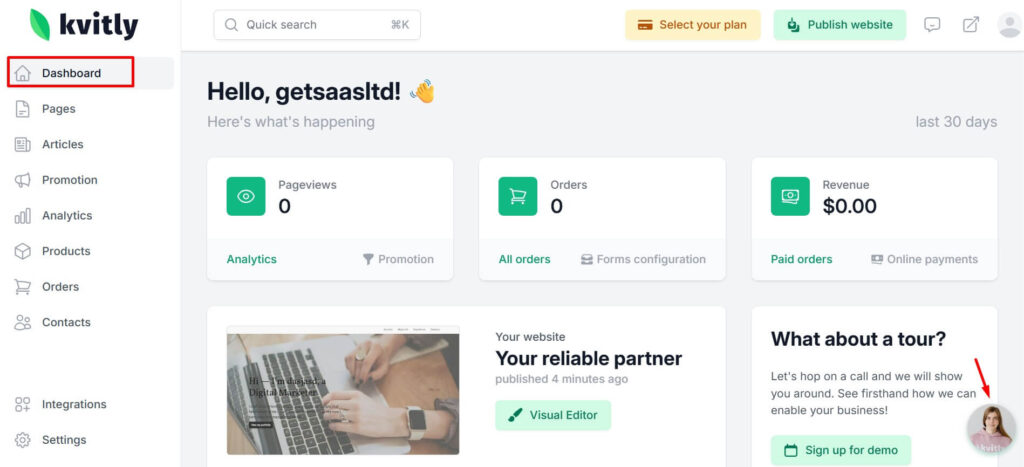
Kvitly’s dashboard is clean and uncluttered. Everything is where you’d expect it to be.
The main navigation sits on the left sidebar. Website, Products, Orders, Customers, and Content are clearly labeled. No hunting through nested menus.
The visual editor loads in seconds. Drag sections, drop elements, and see changes instantly. No save-and-preview cycle that wastes time.
Users report the learning curve is gentle. One reviewer mentioned they “didn’t take much time to learn” the platform. That’s exactly what you want.
Performance is snappy. Pages load fast, and I never experienced crashes or bugs during testing. This reliability matters when you’re managing a live business.
There’s no mobile app currently. You’ll need to use a desktop browser for editing. The sites you build work perfectly on mobile, but you can’t edit from your phone.
Setup time? Most users report going live in under 2 hours. That includes domain connection, design customization, and adding initial products.
How to Use Kvitly: Step-by-Step
Getting started with Kvitly is straightforward. Here’s the exact process:
Step 1: Activate Your License
Purchase your tier on AppSumo and activate within 60 days. You’ll receive login credentials via email.
Step 2: Generate Your Website
Answer questions about your business type, industry, and goals. The AI creates your starting website in 30 seconds.
Step 3: Customize Your Design
Open the visual editor and adjust colors, fonts, images, and layouts. Add or remove sections as needed.
Step 4: Add Your Products
Navigate to Products and create your catalog. Upload images, write descriptions, and set prices for each item.
Step 5: Connect Payment Gateways
Link your Stripe or PayPal account. Follow the authentication prompts. Takes about 2 minutes total.
Step 6: Set Up Your CRM
Create custom pipeline stages for your sales process. Add form fields to capture the lead information you need.
Step 7: Generate Marketing Content
Use the AI content tools to create social posts, ads, and blog articles. Edit and customize the output.
Step 8: Connect Your Domain
Point your custom domain to Kvitly using their DNS instructions. Or use a free subdomain to start.
Step 9: Launch and Test
Preview your site on different devices. Test the checkout process. Then publish and go live.
5 Best Kvitly Alternatives
Wix
Wix offers more design templates and creative control. You get 800+ templates and an advanced design editor.
Pricing starts at $17/month ($204/year). No lifetime option. You’ll pay $1,020 over 5 years.
Choose Wix if: You need extensive design flexibility and don’t mind monthly fees. Better for creative professionals.
WordPress + WooCommerce
WordPress gives unlimited customization through themes and plugins. It’s the most flexible option.
Hosting costs $10-30/month depending on your provider. Plugins add up. Budget $300-500 per year minimum.
Choose WordPress if: You’re technical, want complete control, and have time to manage updates and security.
Bitrix24
Bitrix24 focuses more on team collaboration and project management. Better CRM and communication tools.
Free plan available, but useful features start at $49/month ($588/year) for small teams.
Choose Bitrix24 if: You need advanced team features, video calls, and task management alongside your website.
Shopify
Shopify is the ecommerce powerhouse. Superior inventory management, shipping tools, and sales features.
Plans start at $39/month ($468/year). Plus transaction fees unless you use Shopify Payments.
Choose Shopify if: Ecommerce is your primary business and you need advanced selling features.
Webflow
Webflow offers professional design capabilities with more control than Kvitly. Great for designers and agencies.
Starts at $14/month for basic sites. Ecommerce plans jump to $29/month minimum.
Choose Webflow if: You’re a designer who wants complete creative freedom and are willing to learn the platform.
Kvitly Pros and Cons
Pros
- Affordable lifetime pricing eliminates recurring subscription costs
- Fast and smooth interface with no lag or performance issues
- Usable AI content that sounds natural instead of generic
- All-in-one platform reduces tool complexity and monthly costs
- Built-in CRM and automation removes need for separate tools
- Responsive support team answers questions quickly
- 60-day money-back guarantee makes it risk-free to test
Cons
- Limited mobile editing controls for layout customization
- Fewer design templates compared to Wix or WordPress
- Only for new users (existing accounts can’t access the deal)
- Features still evolving as a newer platform
- No mobile app for on-the-go editing
Who Should Use Kvitly?
Best Suited For
- Freelancers launching service websites with payment acceptance
- Solopreneurs starting online businesses without technical skills
- Small ecommerce stores selling under 1,000 products
- Digital agencies managing multiple client sites (Tier 3-4)
- Budget-conscious entrepreneurs who hate monthly subscriptions
- Business owners wanting simplified tech stack management
Not Ideal For
- Large ecommerce operations needing advanced inventory systems
- Designers requiring pixel-perfect mobile layout control
- Existing Kvitly customers (deal only for new users)
- Enterprise businesses with complex customization requirements
- Businesses heavily dependent on specific third-party integrations
If you fall into the “best suited for” category, Kvitly likely saves you time and money. The lifetime deal makes it especially attractive for bootstrapped businesses.
Final Verdict and Recommendation
After two weeks of testing, I believe Kvitly delivers solid value at $49-99. It’s not the most feature-rich platform out there, but that’s actually its strength.
The all-in-one approach works for people who are tired of managing multiple tools. Instead of paying for a website builder, separate CRM, content tool, and payment processor, you get everything in one dashboard.
The AI content generation is surprisingly good. This alone could justify the price if you regularly create social media posts or ads. It saves hours every week.
Price-to-feature ratio is excellent. Where else can you get lifetime access to a complete business platform for under $100? The Tier 2 plan at $99 is my recommended starting point for serious users.
The mobile editing limitation is real but not a dealbreaker for most people. Sites look good on phones automatically. You just can’t manually tweak mobile-specific layouts yet.
Long-term viability looks promising. The team is actively developing new features and responds to user feedback. They’ve been around since 2015 and completely rebuilt the platform in 2020.
My Rating: 4.2/5 Stars
Recommendation: Buy if you’re a freelancer, solopreneur, or small business owner who wants to simplify your tech stack. Start with Tier 2 ($99) for the advanced AI package.
Skip if you need extensive mobile customization, run a large ecommerce operation, or already have a website system that works well.
The 60-day guarantee removes all risk. Try it, build a site, test the features. If it doesn’t work for you, get a full refund.
Get Kvitly lifetime deal (60-day guarantee)
Conclusion
Kvitly’s lifetime deal offers strong value for small businesses and freelancers who want simplicity. The $49-99 price point is hard to beat for an all-in-one platform.
The AI features work well, the interface is fast, and setup takes minutes instead of days. Mobile editing could be better, but the team is working on improvements.
For most solo business owners, this eliminates 3-4 monthly subscriptions while actually making life easier. That’s a win-win.
Remember the 60-day guarantee. Test it risk-free and see if it fits your workflow.
Frequently Asked Questions
Is Kvitly worth the lifetime deal?
Yes, if you’re starting or running a small business. The $99 Tier 2 plan pays for itself in 2-3 months compared to monthly alternatives. The 60-day guarantee makes it risk-free.
Can I upgrade between tiers later?
Yes, you can upgrade between tiers while the AppSumo deal is available. After the deal ends, upgrades may not be possible.
What happens after 60 days?
After 60 days, your purchase is final and you can’t request a refund. But you keep lifetime access to all features in your tier plus future updates.
Does Kvitly work for ecommerce stores?
Yes, for small to medium stores under 1,250 products. You get Stripe and PayPal integration, order management, and product catalogs. Not ideal for large operations needing advanced inventory systems.
Can I remove Kvitly branding?
Only on Tier 3 and Tier 4 plans. Tier 1 and 2 include Kvitly branding on your site footer.
What integrations are available?
Kvitly integrates with Google Analytics, Google Search Console, PayPal, Stripe, and Zapier. You can also add custom code for other tracking pixels and widgets.