Grain Lifetime Deal Review 2026: Worth $59? (Honest Test)
Grain Analytics Overview:
- Pricing: ⭐⭐⭐⭐⭐ (5/5) – $59 lifetime (92% off)
- Ease of Use: ⭐⭐⭐⭐⭐ (5/5) – Beginner-friendly
- Features: ⭐⭐⭐⭐ (4/5) – Cookie-free analytics, AI assistant, user journey tracking, visual picker
- Performance: ⭐⭐⭐⭐ (4/5) – Real-time data, smooth interface
- Support: ⭐⭐⭐⭐⭐ (5/5) – Founder responds personally, 60-day money-back guarantee
- Best For: Ecommerce stores, SaaS companies, marketing agencies, and privacy-conscious businesses
Overall Rating: 4.5/5
Are you tired of using analytics tools that feel complicated and invade your users’ privacy? I tested Grain for the past two weeks, and I’m giving it a solid 4.5 out of 5 stars.
Here’s my quick verdict: Grain is worth buying if you want simple, cookie-free analytics with AI-powered insights. The AppSumo lifetime deal at $59 offers incredible value compared to the regular $708 annual price. You get real user journey tracking without cookies, a visual element picker, and an AI assistant that answers questions in plain English.
Get Grain lifetime deal on AppSumo (92% off – 60-day money-back guarantee)
In this Grain lifetime deal review, I’ll walk you through my hands-on experience, all the features, pricing tiers, and who should actually buy this tool. I’ll also share five alternatives and give you my honest final verdict.
What is Grain Analytics?
Grain is a cookie-free analytics platform that shows you what visitors actually do on your website. Unlike Google Analytics, it doesn’t use cookies to track users. This means you stay compliant with privacy laws like GDPR without annoying cookie banners.
The platform was founded by Eray Ocak and his team in July 2025. They built Grain after years of working across different industries, from mining sensors to finance apps. They saw that most analytics tools were either too complex, privacy-invasive, or oversimplified.
Grain solves this by combining AI-powered insights with raw data access. You can track user journeys, see what drives conversions, and ask questions in plain English. The best part? You don’t need to write code to track elements on your site.
My Hands-On Experience with Grain
I installed Grain on two of my websites to test it properly. The setup took me about 10 minutes using their WordPress integration. The tracking code was lightweight and didn’t slow down my site.
The dashboard looked clean when I first logged in. I wasn’t overwhelmed with graphs and metrics like I usually am with analytics tools. Everything felt organized and easy to find.
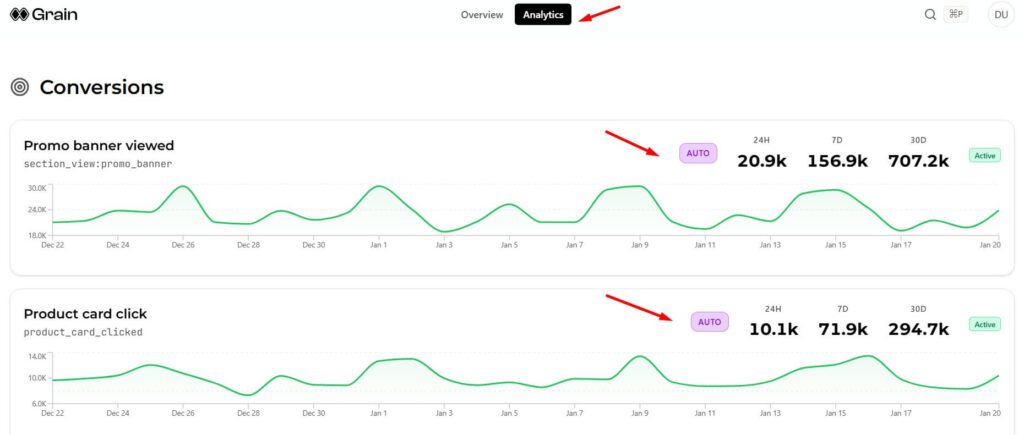
I used the visual picker to track button clicks and form submissions. This was surprisingly easy. I just clicked the element I wanted to track, named it, and Grain handled the rest. No code needed.
The AI assistant Kai impressed me the most. I asked simple questions like “What pages do users visit before converting?” and got clear answers with graphs. It felt like having an analytics expert on my team.
One thing I noticed: the data isn’t as detailed as Google Analytics for traffic sources. But for understanding user behavior and conversions, it’s much better.
Grain Features: What You Actually Get
AI-Powered User Journey Analysis
Grain shows you the complete path users take on your website. You can see which pages they visit, how long they stay, and where they drop off.
The platform identifies conversion drivers automatically. For example, it might show you that users who visit your pricing page twice are more likely to buy. This helps you understand what actually works.
You can also spot drop-off points where users leave. If everyone abandons your checkout page, you know exactly where to focus your improvements.
No-Code Visual Element Tracking
The visual picker is a game-changer. Here’s what you can track without code:
- Button clicks on any element
- Form submissions and interactions
- Video plays and engagement
- Link clicks and navigation
- Scroll depth on pages
- Custom events you define
You just click the element, name your event, and start tracking. Grain automatically attaches listeners and collects data.
Kai AI Assistant
Kai is Grain’s AI-powered assistant that speaks plain English. You can ask questions like:
- “Show me users who converted this week”
- “What’s causing cart abandonment?”
- “Create a funnel for demo bookings”
- “Which traffic sources convert best?”
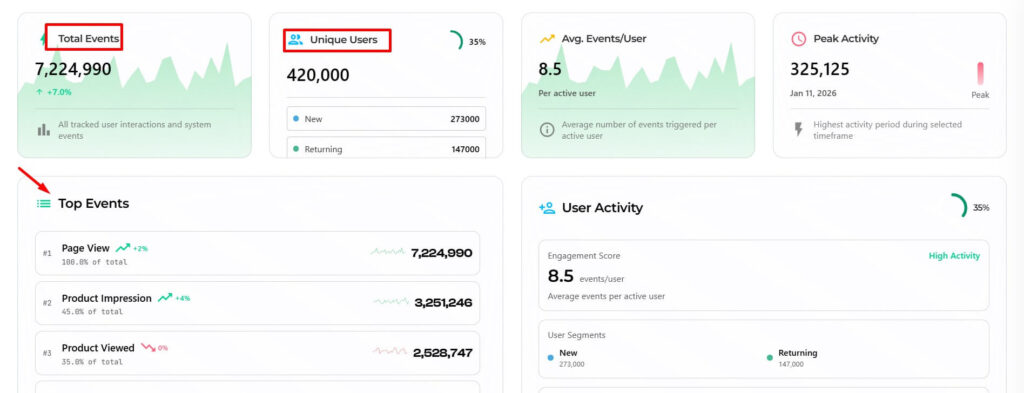
Kai creates graphs, breakdowns, and summaries instantly. You don’t need to know SQL or spend hours building reports.
Privacy-First Architecture
Grain doesn’t use cookies at all. It tracks users through cookieless methods that respect privacy. You stay compliant with GDPR, CCPA, and other privacy laws.
You own all your data. You can query it, export it, or delete it anytime. Every session shows country, device, and attribution details without compromising user privacy.
Grain AppSumo Lifetime Deal Pricing
The AppSumo deal gives you 92% off the regular price. Here’s what each tier includes:
| Feature | Tier 1 | Tier 2 | Tier 3 | Tier 4 |
|---|---|---|---|---|
| Price | $59 | $159 | $299 | $499 |
| Regular Price | $708 | $1,548 | $3,108 | $4,308 |
| Monthly Active Users | 50,000 | 150,000 | 300,000 | 600,000 |
| Total Seats | 1 | 3 | 6 | 15 |
| Hot Retention | 30 days | 60 days | 90 days | 180 days |
| Cold Retention | 3 months | 3 months | 6 months | 12 months |
| Daily API Limit | 20 | 50 | 100 | 200 |
| Kai Credits | 50 | 150 | 300 | 500 |
| Weekly Credit Refill | 5 | 10 | 20 | 30 |
What Each Tier Means
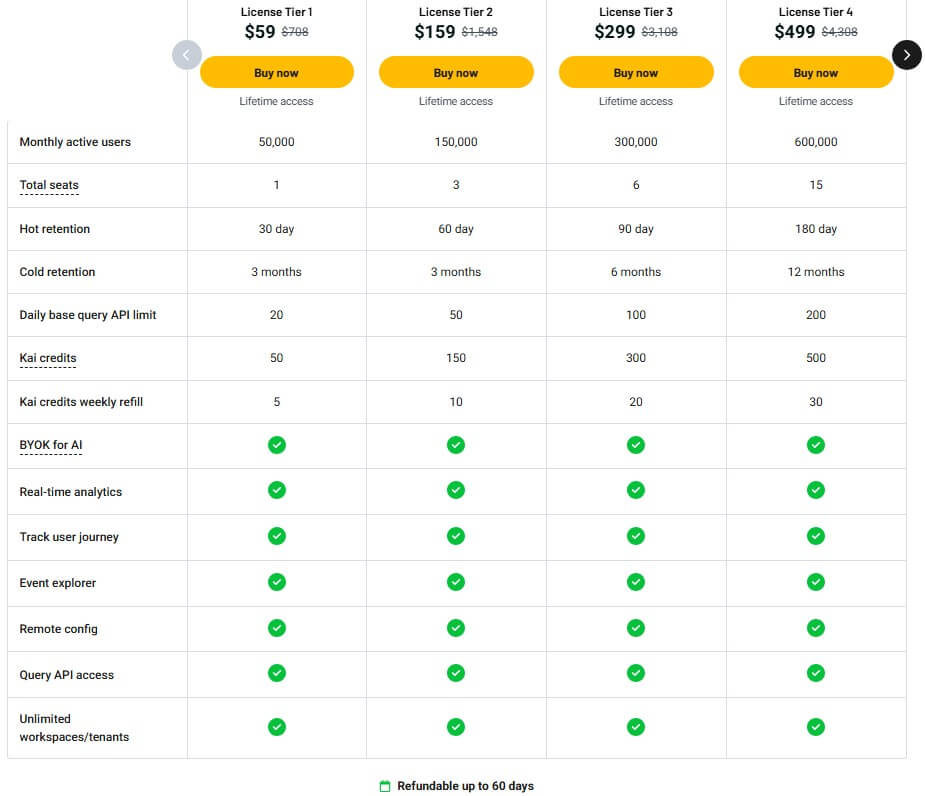
Tier 1 ($59) is perfect for small websites and startups. You get 50,000 monthly visitors tracked, which covers most small businesses. Data stays “hot” (quickly accessible) for 30 days.
Tier 2 ($159) works for growing businesses. Three seats let you add team members. You get 60-day hot retention and more API calls for custom integrations.
Tier 3 ($299) suits mid-size companies. Six seats support larger teams. The 90-day hot retention and 300K monthly users handle significant traffic.
Tier 4 ($499) is for agencies and large businesses. Fifteen seats allow full team collaboration. The 180-day hot retention and 600K monthly users cover enterprise needs.
All tiers include unlimited workspaces, real-time analytics, and the same core features. The only differences are capacity limits and team size.
Check current Grain pricing on AppSumo
User Interface and Ease of Use
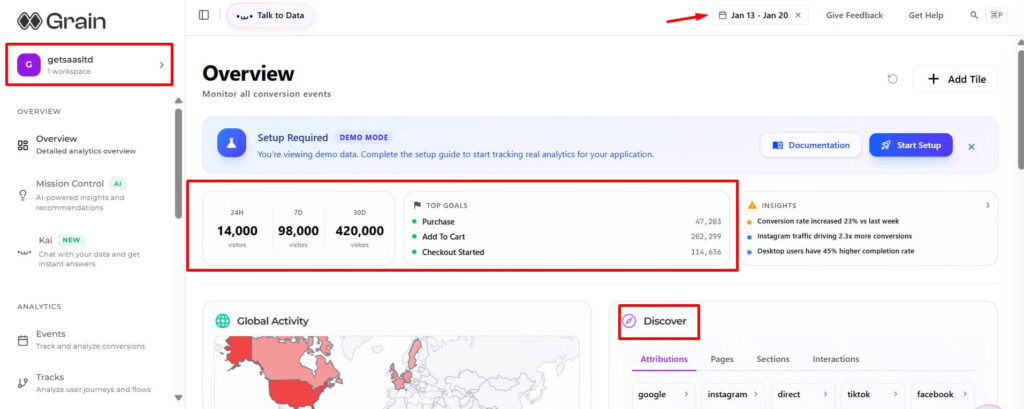
Grain’s dashboard is refreshingly simple. The main screen shows your key metrics without overwhelming you. You see visitor count, conversions, and top pages at a glance.
The left sidebar organizes everything into clear sections. Events, journeys, sessions, and settings are easy to find. Navigation feels natural after just a few minutes of use.
The visual design is clean and modern. Graphs load quickly and adapt to your screen size. I tested it on mobile, and it worked smoothly.
One small issue: the onboarding could be more detailed. I had to check the documentation a few times. But the docs are well-written and include video tutorials.
Customer support responded to my questions within hours. The founder, Eray, personally answered technical questions. This level of support is rare, especially for a lifetime deal.
How to Use Grain: Step-by-Step
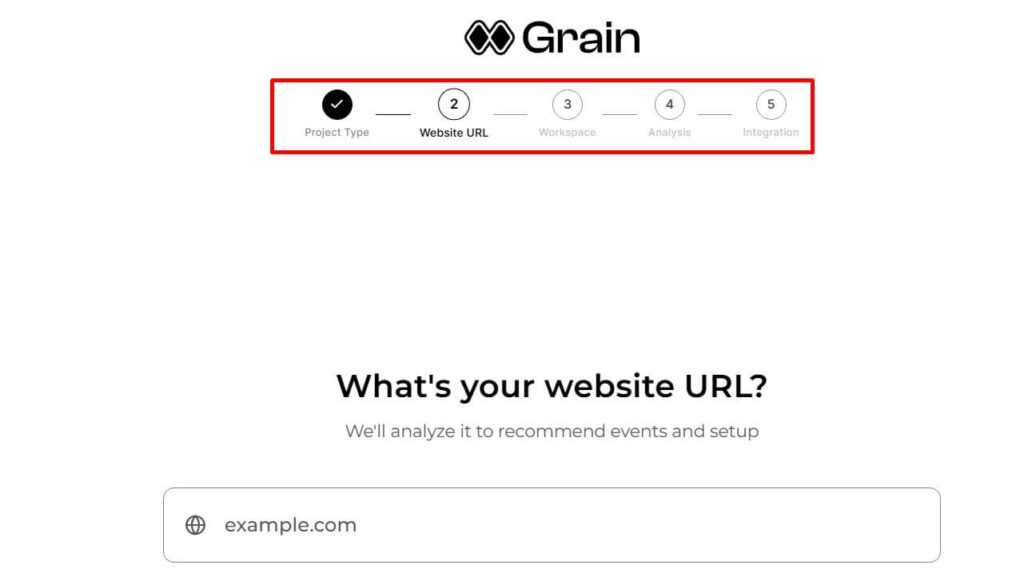
Getting started with Grain is straightforward. Here’s exactly what I did:
Step 1: Activate Your License
After purchasing on AppSumo, I received a license key by email. I clicked the activation link and created my Grain account in under two minutes.
Step 2: Install Tracking Code
Grain offers multiple integration options. I used the WordPress plugin for one site and Google Tag Manager for another. Both took about five minutes to set up.
Step 3: Configure Your First Events
I clicked “Add Event” and used the visual picker to select buttons and forms. Grain showed me a preview before I saved each event.
Step 4: Set Conversion Goals
I defined what counts as a conversion for my sites. For one, it was form submissions. For the other, it was button clicks to the pricing page.
Step 5: Create Custom Dashboards
I built a simple dashboard showing my most important metrics. Grain lets you customize what you see first when you log in.
Step 6: Ask Kai Questions
I started with basic questions like “How many visitors converted yesterday?” Then I asked more complex ones about user journeys. Kai answered them all clearly.
Step 7: Analyze User Journeys
The journey view showed me the paths users take. I could see common patterns and unusual behaviors. This helped me identify optimization opportunities.
Step 8: Export Data
I tested the export feature to download raw data. The CSV file included everything I needed for deeper analysis.
5 Best Alternatives to Grain
If Grain doesn’t fit your needs, here are five solid alternatives:
1. Google Analytics
The most popular free analytics tool. It offers comprehensive data but uses cookies and has a steep learning curve. Best for businesses already invested in Google’s ecosystem. Pricing: Free (GA4).
2. Hotjar
Focuses on heatmaps and session recordings. Great for seeing exactly how users interact with your site. More expensive than Grain and doesn’t offer AI insights. Pricing: Starts at $39/month.
3. Mixpanel
Best for product analytics and SaaS companies. Excellent for tracking specific user actions and cohorts. More complex to set up than Grain. Pricing: Starts at $28/month.
4. Plausible Analytics
Simple, privacy-first analytics with a clean dashboard. Lighter than Grain but lacks AI features and user journey tracking. Pricing: Starts at $9/month.
5. Matomo
Self-hosted option that gives you complete data control. Requires technical knowledge to maintain. Good alternative if you want to avoid third-party hosting. Pricing: Free (self-hosted) or $23/month (cloud).
Grain Pros and Cons
Pros
- Cookie-free tracking keeps you privacy-compliant without cookie banners
- AI assistant Kai answers questions in plain English and creates reports
- Visual picker lets you track any element without writing code
- Excellent lifetime deal value at 92% off regular pricing
- Unlimited workspaces let you manage multiple sites or clients
- Strong customer support with personal responses from the founder
- Real-time analytics show data as it happens
- Clean interface that’s easy to navigate and understand
Cons
- Newer platform with limited track record (launched July 2025)
- Smaller user community compared to established tools
- MAU limits on lower tiers may not suit high-traffic sites
- Limited integrations currently (though expanding)
- AI credits consumption requires monitoring on heavy usage
- Less detailed traffic sources compared to Google Analytics
Who Should Use Grain?
Grain works best for specific types of users and businesses. Here’s who should consider buying:
Ecommerce stores tracking customer journey and conversion paths. The visual picker makes it easy to track add-to-cart clicks and checkout steps.
SaaS companies analyzing how users interact with their product. The AI insights help identify which features drive upgrades.
Marketing agencies managing analytics for multiple clients. Unlimited workspaces and team seats make this affordable.
Developers who want API access and raw data control. Grain gives you full database access for custom analysis.
Privacy-conscious businesses avoiding cookie-based tracking. You stay compliant without sacrificing insights.
Budget-conscious startups needing enterprise features without enterprise pricing. The lifetime deal eliminates recurring costs.
Teams wanting collaborative analytics without per-user fees. Higher tiers include multiple seats at no extra cost.
Final Verdict and Recommendation
After two weeks of testing, I believe Grain is worth buying for most small to medium-sized businesses. The combination of cookie-free tracking, AI insights, and visual element picking solves real problems.
The AppSumo lifetime deal offers exceptional value. You’re paying $59 for what normally costs $708 annually. Even if you only use it for two years, you save over $1,300.
My rating: 4.5 out of 5 stars
I’m deducting half a star because it’s a newer platform. There’s always some risk with new tools. But the 60-day money-back guarantee eliminates that risk completely.
Who Should Buy
Buy Grain if you want simple analytics with AI insights and don’t want to deal with cookies. It’s perfect for ecommerce stores, SaaS companies, and agencies.
Skip it if you need extremely detailed traffic source data or have very high traffic (over 600K monthly visitors). Google Analytics might serve you better.
Best Tier Recommendation
- Tier 1 for small websites under 50K monthly visitors
- Tier 2 for growing businesses with small teams
- Tier 3 for mid-size companies with 100K+ visitors
- Tier 4 for agencies managing multiple client sites
Start with Tier 1 if you’re unsure. You can always upgrade while the deal is live. But you can only downgrade within 60 days of purchase.
The future looks promising for Grain. The team is actively developing new features like heatmaps. Early adopters will benefit from all future updates included in the lifetime deal.
Get the Grain lifetime deal now before the AppSumo offer ends. Remember, you have 60 days to test it risk-free.
Final recommendation: Buy it. The value is too good to pass up if you need analytics that respects privacy and provides AI-powered insights.