Mootion AI Lifetime Deal Review 2026: Worth The $69 Investment?
Mootion LTD Overview:
- Pricing: ⭐⭐⭐⭐⭐ (5/5) – $69 lifetime (52% off)
- Ease of Use: ⭐⭐⭐⭐ (4/5) – Beginner-friendly
- Features: ⭐⭐⭐⭐ (4.5/5) – AI automation, 1080p, commercial use
- Performance: ⭐⭐⭐⭐ (4/5) – 2-5 minute generation
- Support: ⭐⭐⭐⭐ (4/5) – 60-day money-back guarantee
- Best For: Content creators, educators, and marketers
Overall Rating: 4.2/5
Looking for a way to create professional videos without spending hours editing? I tested Mootion for two weeks to see if this AI video generator lives up to the hype.
After creating eight different videos across multiple use cases, I’m giving Mootion a solid 4.2 out of 5 stars. The tool delivers impressive cinematic quality and saves serious time. But it has some limitations you need to know about before buying.
Quick verdict: If you create short-form content for social media or marketing, the Mootion lifetime deal is worth grabbing. For documentary creators or high-volume producers, you might hit the scene limits fast.
In this mootion lifetime deal review, I will break down everything you need to know. I will cover the features, pricing tiers, my hands-on experience, and who should actually buy this deal.
The AppSumo lifetime deal ends soon, so let’s dive in.
Mootion AI at a Glance
Here’s everything you need to know about Mootion in one quick table:
| Category | Details |
|---|---|
| Founder | Chao Tong (Co-Founder) |
| Founded | June 2024 |
| Headquarters | Hong Kong |
| My Rating | 4.2/5 stars |
| Best For | Content creators, educators, marketers |
| Starting Price | $69 (Tier 1 lifetime deal) |
| Regular Price | $144 (52% discount) |
| Top Alternatives | Descript, Powtoon, Synthesia, Pictory, InVideo |
| Money-Back Guarantee | 60 days |
| Output Quality | 1080p, watermark-free |
| Company Stage | Series A, 11-50 employees |
The deal is currently live on AppSumo with limited time remaining. You can test it risk-free for 60 days.
What Is Mootion?

Mootion is an AI-powered video generator that turns text, images, and audio into animated videos. You don’t need any editing skills or expensive software.
The platform launched in June 2024 with a clear mission. They wanted to make professional video creation accessible to everyone. No more spending thousands on Adobe Premiere or hiring video editors.
You simply type a prompt or upload your content. Mootion handles everything from scene structure to animations and voiceovers. The AI automatically creates a complete video story in minutes.
The tool works best for explainer videos, social media content, marketing materials, and educational videos. It uses advanced AI to generate characters, movements, and transitions automatically.
My Hands-On Experience With Mootion AI
I tested Mootion with real projects. I created product explainers, social media clips, educational content, and brand story videos.
The onboarding took less than five minutes. You redeem your AppSumo code, pick your plan, and you’re ready to create. The interface felt intuitive from day one.
My first video was a 60-second product explainer. I typed a simple prompt describing the product and target audience. Mootion generated the full video in about three minutes. The quality genuinely surprised me.
I tried the multi-modal input by uploading a blog post script. The AI converted it into a five-scene video with matching visuals and narration. The pacing felt natural and professional.
The biggest time-saver was the automated voiceover. I didn’t have to record anything or hire voice actors. The AI voices sound realistic, not robotic.
However, I hit some bumps. Credits consumed faster than expected for longer videos. The 32-scene limit forced me to split a 10-minute educational video into parts. And I couldn’t test voiceover pronunciation until after rendering.
Despite these issues, I created a few polished videos in under two hours total. That’s impossible with traditional editing software.
Key Features Of Mootion AI
Let me walk you through the core features that matter most for actual video creation.
Core Video Generation Features
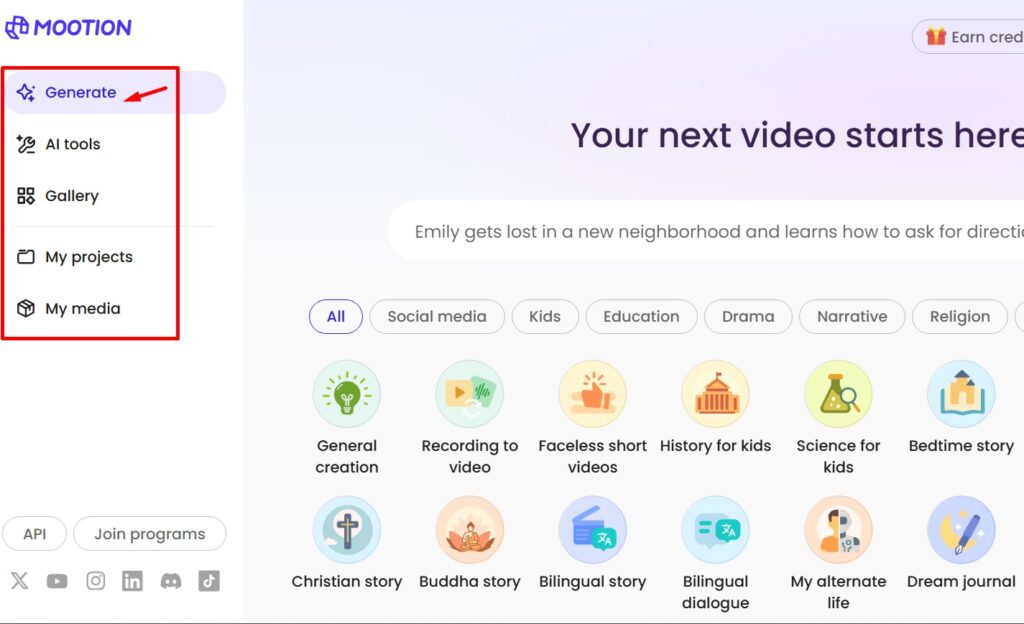
The prompt-to-video system is Mootion’s strongest feature. You describe what you want, and the AI builds everything automatically.
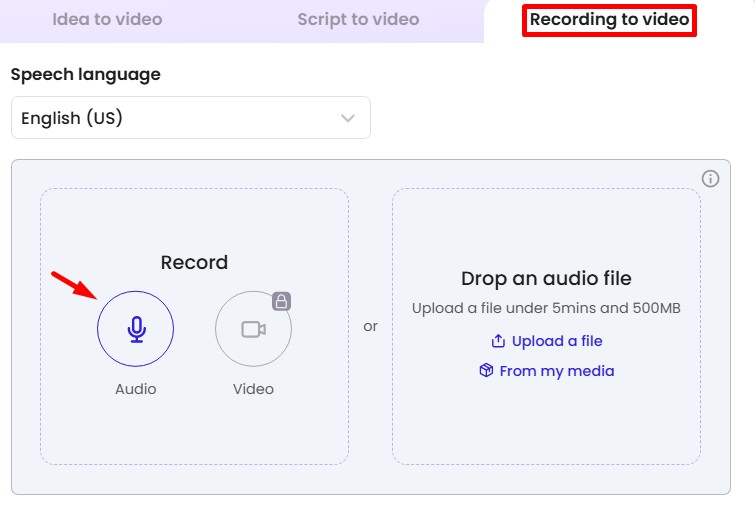
Multi-modal input support means you can start with:
- Plain text prompts
- Existing scripts or blog posts
- Images you want animated
- Audio files that need visuals
The platform shows you a real-time visualization workflow. You can see exactly what the AI is doing as it generates your video. This transparency helps you understand the process.
Scene structure happens automatically. The AI decides how many scenes you need, what goes in each scene, and the pacing. You can override these decisions if needed.
Customization and Editing Capabilities
Every video is fully editable at the scene level. You’re not locked into what the AI generates.
You can change:
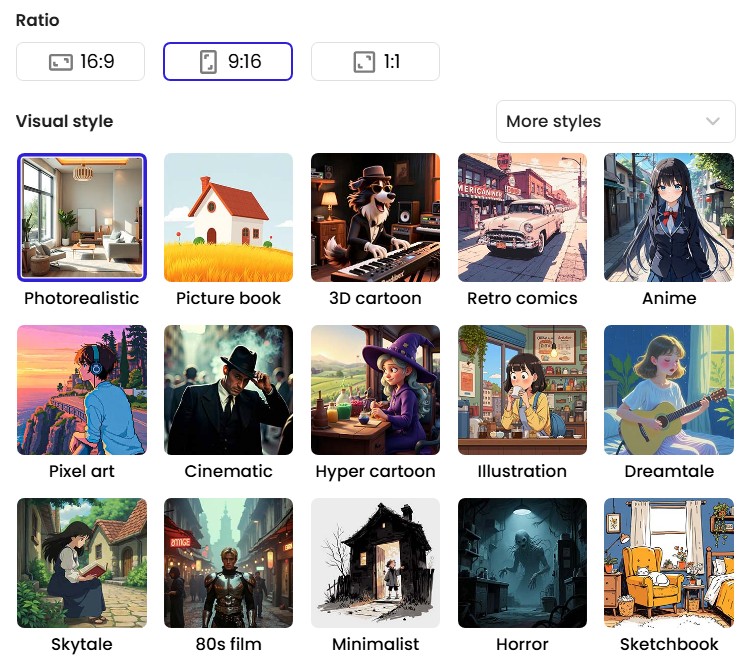
- Visual styles (cinematic, cartoon, realistic, minimalist)
- AI avatar appearances and layouts
- Subtitle positioning and styling
- Transition effects between scenes
- Animation speed and intensity
The editor works like a storyboard. You see all scenes at once and can drag to reorder them. Changes apply instantly without re-rendering the whole video.
I particularly liked the style consistency. Once you set your preferences, Mootion remembers them for future projects. Your brand stays consistent across all videos.
AI Voiceover and Audio
The voiceover quality impressed me most during testing. These aren’t the robotic text-to-speech voices from five years ago.
Mootion offers ultra-realistic voice synthesis with different accents and tones. You can adjust the emotion and pacing of the narration. The voices sound natural in most languages.
The background music library includes commercial-use tracks. You don’t need to worry about copyright claims. The music matches your video’s mood automatically.
One limitation: you can’t test pronunciation before rendering. For non-English content, this means you might need to regenerate if the AI mispronounces words. The team is working on adding a test button.
Output and Export Options
All videos export in 1080p resolution without watermarks. This is huge for professional use.
You can download videos directly or get a .zip file with all assets. The .zip includes scripts, individual images, and video clips. This lets you fine-tune in other editing software if needed.
Aspect ratios are flexible. Create square videos for Instagram, vertical for TikTok, or horizontal for YouTube. The AI adjusts compositions automatically for each format.
Check out the full feature list on AppSumo to see everything included in your lifetime deal.
Mootion AI AppSumo Lifetime Deal Pricing and Tiers
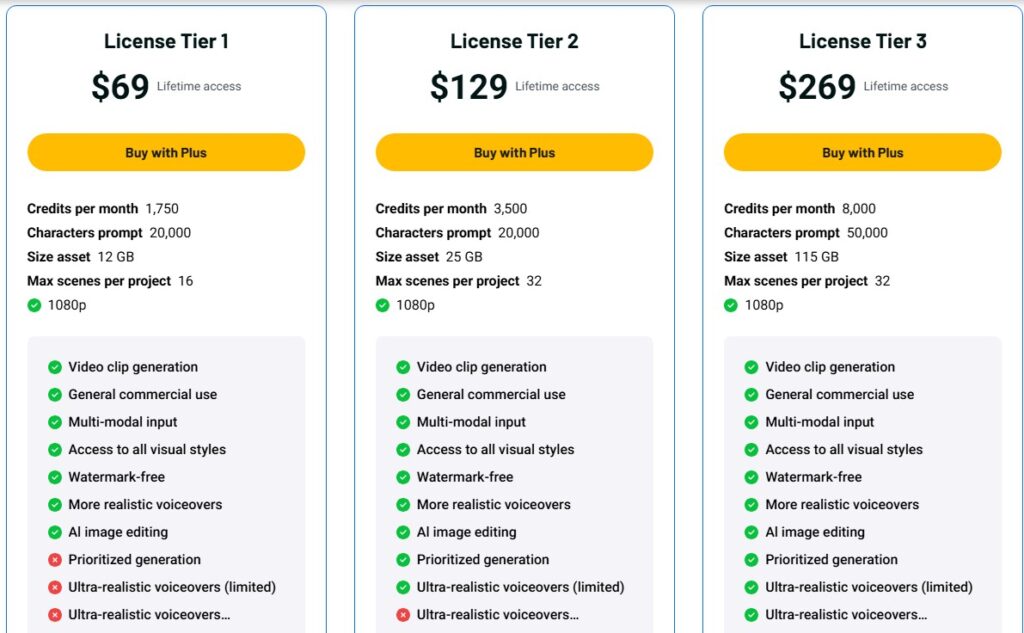
Mootion offers three lifetime tiers on AppSumo. Here’s how they compare:
| Feature | Tier 1 ($69) | Tier 2 ($129) | Tier 3 ($269) |
|---|---|---|---|
| Regular Price | $144 | $252 | $552 |
| Credits/Month | 1,750 | 3,500 | 8,000 |
| Storage | 12 GB | 25 GB | 115 GB |
| Max Scenes | 16 | 32 | 32 |
| Character Limit | 20,000 | 20,000 | 50,000 |
| 1080p Export | ✓ | ✓ | ✓ |
| Watermark-Free | ✓ | ✓ | ✓ |
| Commercial Use | ✓ | ✓ | ✓ |
Tier 1 – $69 (52% Off)
This tier works for casual creators or people testing the platform.
What 1,750 credits gets you:
- Approximately 40-80 short videos per month
- 16 scenes maximum per project
- Good for social media clips under 2 minutes
Best for: Small business owners, educators creating short lessons, social media managers
The 16-scene limit means your videos max out around 2-3 minutes. For Instagram Reels or TikTok, that’s perfect.
Tier 2 – $129 (49% Off)
The middle tier doubles your credits and scene count. This is the sweet spot for most creators.
What 3,500 credits provides:
- 80-160 videos monthly depending on length
- 32 scenes for longer content (5-6 minutes)
- 25GB storage for ongoing projects
Best for: Content creators producing regular videos, marketing agencies, YouTubers focusing on explainers
I recommend this tier if you plan to create 2-3 videos per week consistently. The 32-scene limit handles most standard content.
Tier 3 – $269 (51% Off)
The professional tier offers massive credit allowance and storage.
What 8,000 credits enables:
- 200+ videos per month for high-volume needs
- 50,000 character prompts for detailed scripts
- 115GB storage for large asset libraries
Best for: Agencies serving multiple clients, course creators, professional content studios
The expanded character limit lets you input longer scripts. You can create more complex narratives without hitting text restrictions.
Mootion AI Credit System
Credits work differently than you might expect. Here’s the breakdown:
- New video generation: 20-40 credits base cost
- Video regeneration: Additional 20-40 credits
- Image creation: 2 credits per image
- Image animation: 8-16 credits per second
Longer videos with more scenes consume more credits. Complex animations cost extra. Plan your projects accordingly to maximize your monthly allocation.
User Interface and Ease of Use: Beginner-Friendly or Not?
The Mootion dashboard is surprisingly simple. Even if you’ve never edited video before, you’ll figure it out fast.
The main screen shows your projects in a grid layout. Click “Create New” and you choose between prompt-based or template-based creation. Templates help beginners get started quickly.
The learning curve is minimal. I was creating decent videos within 30 minutes of signing up. The AI handles the complex parts automatically.
The template library organizes content by use case. Marketing templates, educational formats, social media styles, and storytelling structures are all pre-built. You just customize them.
One minor complaint: the mobile experience is limited. You can view projects but serious editing requires a desktop browser. Not ideal for creators who work primarily on tablets.
User reviews mention the interface positively. Most people find it more intuitive than Descript or traditional editors like Adobe Premiere.
How to Use Mootion: Step-by-Step Walkthrough
Let me walk you through creating your first video from scratch.
Step 1: Account Setup Redeem your AppSumo code on Mootion’s website. Choose your tier and activate your account. This takes about two minutes.
Step 2: Create New Project Click “Create New Project” and choose “From Prompt.” Type a description of your video. Be specific about tone, target audience, and key points.
Step 3: Review the Storyboard Mootion generates a complete storyboard with scenes, visuals, and script. Review each scene and make sure the flow works.
Step 4: Customize Scenes Click any scene to edit. Change the visual style, adjust text, swap images, or modify animations. The preview updates in real-time.
Step 5: Add Voiceover and Music Select your preferred voice from the dropdown menu. Choose background music that fits your video’s mood. Adjust volume levels if needed.
Step 6: Generate and Export Click “Generate Video” and wait 2-5 minutes depending on length. Once complete, download your 1080p file or the asset package.
Pro tip: Save credit by getting your storyboard perfect before generating. Each regeneration costs additional credits.
5 Best Mootion Alternatives Compared
Not sure if Mootion is right for you? Here are five alternatives worth considering:
1. Descript Best for podcast and audio-first content creators. Descript excels at transcription and audio editing with video capabilities added. It’s more expensive but offers frame-by-frame control.
2. Synthesia Superior choice for corporate training videos with AI avatars. Synthesia has more realistic talking heads and supports 120+ languages. Starting price is higher at $30/month.
3. Pictory Better for summarizing long-form content into short videos. Pictory automatically extracts key points from articles or scripts. Great for repurposing blog content.
4. InVideo Offers more template variety for social media content. InVideo has 5,000+ templates but less automation than Mootion. You do more manual editing.
5. Runway ML Professional tool with advanced creative control. Runway offers cutting-edge AI features for filmmakers. It’s powerful but has a steep learning curve.
| Tool | Best For | Starting Price | Key Strength |
|---|---|---|---|
| Mootion | Automated animated videos | $69 lifetime | AI automation |
| Descript | Podcast + audio editing | $24/month | Transcription |
| Synthesia | Corporate training | $30/month | AI avatars |
| Pictory | Content repurposing | $23/month | Summarization |
| InVideo | Template variety | $25/month | 5000+ templates |
| Runway ML | Professional filmmaking | $15/month | Advanced AI |
Mootion stands out for automation and lifetime pricing. The AppSumo deal eliminates monthly fees completely.
Mootion Pros and Cons
Let me break down the real advantages and limitations based on my testing.
Pros
- Cinematic quality output: The videos genuinely look professional. Smooth animations, clean transitions, and polished visuals match or exceed tools costing 10x more.
- Zero editing skills required: I created quality videos without touching a timeline or keyframe. The AI handles technical complexity completely.
- Watermark-free 1080p videos: No branding on your exports. This is essential for professional use and client work.
- Fast generation times: Most videos finish in 2-5 minutes. Compare that to hours in traditional editing software.
- Commercial use included: You can use videos for client projects, sell them, or monetize on platforms. No restrictions.
- Faceless video capability: Perfect for privacy-focused creators or brand content that doesn’t need people on camera.
- 60-day money-back guarantee: AppSumo’s refund policy lets you test thoroughly before committing.
Cons
- Credits consume quickly: Long videos or multiple regenerations drain your monthly allocation fast. Budget your projects carefully.
- 32-scene limitation: Restricts videos to roughly 6-8 minutes maximum. Documentary creators or course builders need to split content.
- Limited language support: Missing important languages like Urdu, Hindi, Turkish, and Swedish. Expansion is planned but not available yet.
- Voiceover testing only after render: You can’t preview pronunciation before generating. This wastes credits if the AI mispronounces key terms.
- Photo-to-avatar not ready: Can’t turn your photo into a talking avatar yet. This feature is coming but not available at launch.
- Not ideal for high-volume: If you need 20+ long videos weekly, you’ll exceed credit limits without purchasing extra.
The pros significantly outweigh the cons for most use cases. But be honest about your specific needs before buying.
Who Should Buy the Mootion Lifetime Deal?
Mootion works great for certain creators and poorly for others. Here’s who benefits most:
Ideal Users
- Social media content creators producing short-form videos daily. The automation saves hours compared to manual editing. Credits handle multiple clips easily.
- Educators creating explainer content for online courses. The template system makes consistent lesson videos simple. Students respond well to the animated style.
- Small business marketers with limited budgets. You get professional videos without hiring agencies. The lifetime deal eliminates subscription costs.
- Faceless YouTube channel operators focusing on facts, lists, or educational content. Mootion’s animated style fits this niche perfectly.
- Brand storytellers needing consistent output. The style memory keeps all videos on-brand automatically.
Who Should Skip
- Professional video editors needing frame-by-frame control. You’ll find the automation limiting. Stick with Adobe Premiere or Final Cut Pro.
- Documentary filmmakers requiring 30+ minute videos. The scene limits force excessive splitting. Traditional editing tools serve you better.
- High-volume agencies producing dozens of long videos weekly. Credit limits become expensive fast. Consider enterprise solutions instead.
- Creators requiring specific languages not yet supported. Check if your target language is available before buying.
If you’re in the ideal user category, grab the deal. If you’re in the skip category, save your money.
Final Verdict: Should You Buy Mootion’s AI Lifetime Deal?
After extensive testing, I’m recommending Mootion for most content creators, educators, and small business marketers.
The platform delivers on its core promise. You get professional animated videos without editing skills or expensive subscriptions. The lifetime deal at $69-$269 is genuinely valuable compared to monthly competitors.
My tier recommendations:
- Tier 1 ($69): Perfect for casual users testing the waters or creating 1-2 videos weekly
- Tier 2 ($129): Best value for serious creators producing regular content
- Tier 3 ($269): Worth it for agencies or high-volume creators managing multiple projects
The 60-day refund policy eliminates risk. Test the platform with real projects and refund if it doesn’t fit your workflow.
Minor issues like credit consumption and scene limits won’t affect most users. The team is actively improving based on feedback. Language support and photo-to-avatar features are coming soon.
For the current discounted price, Mootion offers exceptional ROI. You’re buying a lifetime of professional video creation for less than three months of competing subscriptions.
My recommendation: Buy Tier 2 if you create content regularly. The expanded credits and scene count provide room to grow. You won’t regret having extra capacity.
Get your Mootion lifetime deal on AppSumo before the discount ends. The price increases after the sale period closes.
Frequently Asked Questions
Can I upgrade between tiers later?
Yes, AppSumo allows tier upgrades during the deal period. You pay the difference between tiers. After the deal ends, upgrades may not be available.
Do credits roll over monthly?
No, unused credits reset each month. Plan your projects to maximize your allocation. The team may add rollover in future updates.
Is commercial use really included?
Absolutely. You can create videos for clients, sell them, or monetize on any platform. No additional licensing fees apply.
What happens if I exceed scene limits?
You’ll need to split longer projects into multiple videos. Or upgrade to a higher tier with more scenes per project.
Can I cancel and get a refund?
AppSumo offers a 60-day money-back guarantee. Request a refund through your AppSumo dashboard if unsatisfied.