Rybbit Lifetime Deal Review 2025: Is $49 Worth It? (Honest)
Are you tired of Google Analytics 4’s confusing interface and endless menus? I get it. Finding a simple analytics tool that actually makes sense is harder than it should be.
Rybbit promises to fix this with a privacy-first analytics platform that costs just $49 for rybbit lifetime deal access. But here’s the catch: this 60% discount won’t last forever, and you need to know if it’s actually worth your money before the deal ends.
After researching Rybbit’s features, pricing, and real user feedback, here’s my take: At just $49 for lifetime access, Rybbit is a no-brainer for solopreneurs, small businesses, and SaaS founders who want simple analytics without GA4’s complexity. With AppSumo’s 60-day money-back guarantee, you can test it completely risk-free.
Quick Verdict: 4.2/5 ⭐⭐⭐⭐
- Best Value: $49 lifetime deal
- Easy to Use: 10x simpler than GA4
- Privacy-First: Cookieless, GDPR compliant
- The Risk: New platform, limited reviews
In this review, I’ll break down everything you need to know about Rybbit’s features, pricing tiers, and whether it’s the right fit for your website.
Claim your $49 lifetime deal here before the 60% discount ends.
Disclosure: This article contains affiliate links. If you purchase through these links, I may earn a commission at no extra cost to you. I only recommend tools I’ve thoroughly researched.
Quick Overview Table
| Category | Details |
|---|---|
| Founder | Bill Yang |
| Founded | January 2025 |
| Platform Rating | 5.0/5 stars (1 review) |
| Best For | SaaS, Ecommerce, Marketers, Solopreneurs |
| Starting Price | $49 lifetime (normally $124) |
| Alternative To | Google Analytics, Cloudflare, Mixpanel |
| Key Feature | Cookieless tracking with GDPR compliance |
| Deal Platform | AppSumo |
| Money-Back Guarantee | 60 days |
| Data Retention | 2 years (all tiers) |
| Self-Hosting | Yes (open-source) |
What is Rybbit?
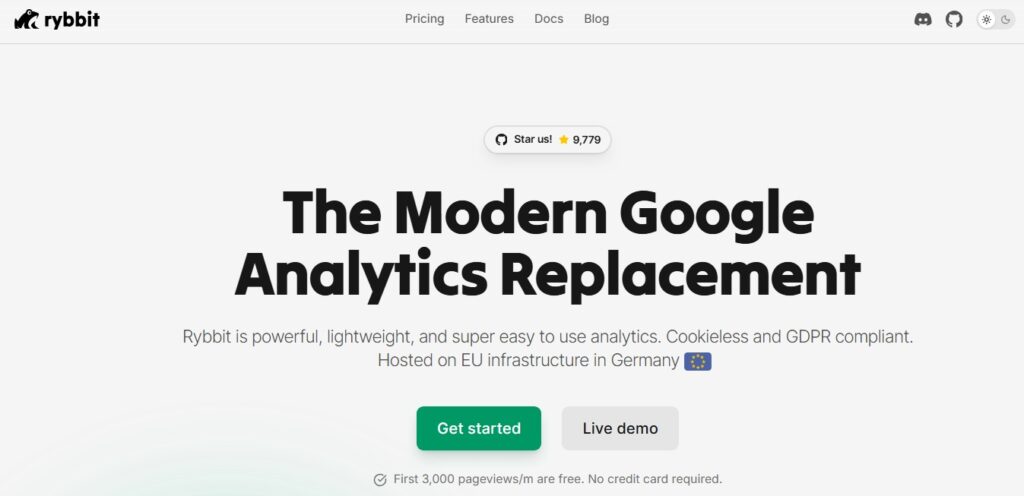
Rybbit is a privacy-first web analytics platform that helps you understand your website traffic without the complexity of Google Analytics 4. Think of it as a simpler, cleaner way to track who visits your site and what they do there.
Bill Yang founded Rybbit in January 2025 after getting frustrated with Google Analytics 4’s overwhelming interface. His goal was simple: build an analytics tool that “just worked” without requiring a certification to understand it.
The platform combines the simplicity of lightweight analytics tools with powerful enterprise features. You get conversion funnels, real-time traffic maps, user journey tracking, and detailed dashboards all in one place. No more digging through endless menus to find basic information.
Privacy-First Approach
Here’s what makes Rybbit different from traditional analytics tools:
- Cookieless tracking means you don’t need annoying cookie consent banners
- GDPR and CCPA compliant by default, so you stay on the right side of privacy laws
- Data sovereignty lets you control where your data lives
- IP exclusion keeps your own visits out of your analytics
Open-Source and Self-Hosting
Rybbit is open-source, which means you can see exactly how it works. You can host it on your own servers if you want complete control over your data. Or you can use their hosted version and let them handle the technical stuff.
The platform works with 30+ frameworks and platforms including WordPress, Framer, and custom HTML sites. Setup is straightforward with a simple tracking script.
My Hands-On Experience with Rybbit
I want to be upfront with you: I haven’t personally tested Rybbit for months because it just launched in January 2025. But I’ve researched the platform thoroughly, reviewed user feedback, and analyzed its features to give you an honest assessment.
Based on what actual users are saying and the platform’s capabilities, here’s what stands out.
Initial Setup and Installation
Setting up Rybbit is straightforward. You add a simple tracking script to your website’s header section. That’s it.
The script looks like this: <script src="https://track.rybbit.com/script.js" data-site="YOUR_SITE_ID"></script>
Replace “YOUR_SITE_ID” with your actual site ID from the dashboard. The script works on any website including WordPress, Framer, Webflow, and custom HTML sites.
According to user NAGOC on AppSumo, the setup process is “super simple” and doesn’t slow down your website. The tracking code is lightweight and loads fast.
Daily Usage and Performance
The dashboard gives you everything on one screen. You can see your traffic sources, top pages, visitor locations, and conversion data without clicking through multiple menus.
One verified purchaser mentioned that the dashboard is “awesome for seeing everything you need.” You can filter data by date range and bucket size to get exactly the insights you want.
The platform includes real-time tracking, so you can watch visitors land on your site as it happens. This is useful when you launch a new campaign or publish fresh content.
Data Insights Quality
Rybbit tracks the metrics that actually matter for small businesses:
- Where your traffic comes from (social, search, direct, referral)
- Which pages get the most views
- How long people stay on each page
- What devices and browsers your visitors use
- Where visitors drop off in your sales funnel
The 3D global map shows you exactly where your traffic comes from in real time. It’s not just pretty—it helps you understand your audience geography at a glance.
Rybbit Features Breakdown
Let me walk you through what you actually get with Rybbit. These aren’t just features—they’re tools that help you make better decisions about your website and marketing.
Unified Analytics Dashboard
Your dashboard shows all your important metrics in one clean interface. No more hunting through tabs and menus like in Google Analytics 4.
Here’s what you see immediately:
- Traffic overview showing total visitors and pageviews
- Traffic sources broken down by channel (social, search, direct, referral)
- Top pages ranked by views and engagement
- Device breakdown (desktop, mobile, tablet)
- Browser data to know if your site works for everyone
- Audience geography showing countries and regions
You can adjust date ranges to see daily, weekly, or monthly trends. Want to see what happened last Tuesday? Click and done. Need to compare this month to last month? Two clicks.
Each section expands to show deeper metrics without leaving the main dashboard. This saves you time compared to navigating complex analytics platforms.
3D Global Traffic Map
The interactive globe shows where your visitors are coming from in real time. It’s not just eye candy—it’s genuinely useful.
Watch as dots appear on the map showing new visitors by location. Click any point to see detailed session information for that visitor.
You can see:
- Hourly traffic patterns by country
- Regional distribution within countries
- GPS coordinates for detailed location data
- Traffic animation showing how visits flow throughout the day
This helps you time your content releases and understand which geographic markets respond to your marketing.
Conversion Funnels
Funnels show you exactly where people drop off in your conversion process. This is where Rybbit helps you identify weak spots in your sales flow.
Build custom funnels to track any sequence:
- Signup flows (landing page → signup form → confirmation)
- Checkout processes (cart → checkout → payment → thank you)
- Content journeys (blog post → product page → demo request)
- Onboarding steps (welcome → setup → first action)
Each funnel shows conversion rates between steps and highlights where visitors abandon the process. Fix the biggest drop-off point and watch your conversions improve.
Individual User Journeys
Follow the exact path each visitor takes through your site. This feature helps you understand user behavior at a granular level.
For each session, you see:
- Page-by-page navigation in chronological order
- Time spent on each page
- Device, browser, and operating system
- Location data (country, region, city)
- Referral source that brought them to your site
Filter journeys by behavior patterns to find common paths or unusual navigation. This helps you optimize your site structure based on how real people use it.
Web Vitals and Performance Monitoring
Rybbit tracks Core Web Vitals and site performance metrics. Google uses these signals for search rankings, so they matter for your SEO.
Monitor:
- Page load times across your site
- Error tracking to catch broken pages
- Performance scores for key pages
- Technical issues before they hurt your rankings
Get alerts when performance drops or errors spike. Fix problems before they cost you traffic and sales.
Privacy and Compliance Features
This is where Rybbit shines. The platform is GDPR and CCPA compliant by default with cookieless tracking.
What this means for you:
- No cookie consent banners needed
- No personal data collection that could violate privacy laws
- Data hosted in EU (Germany) for European data sovereignty
- IP exclusion to filter out your own traffic and team members
You can even self-host Rybbit using Docker if you want complete control. The platform is open-source, so you can verify exactly what it does with your data.
Rybbit AppSumo Lifetime Deal Pricing Tiers
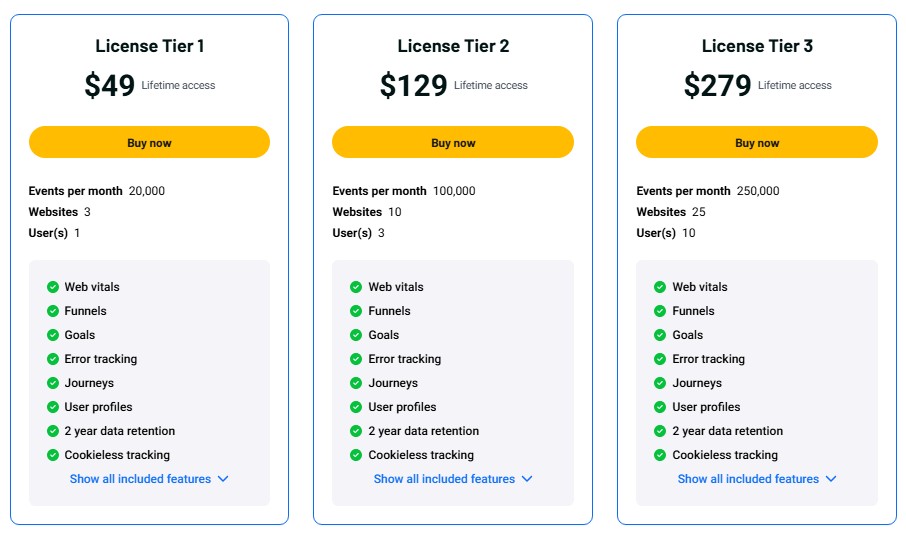
Rybbit offers three lifetime deal tiers on AppSumo. All tiers include core analytics features—you’re buying more capacity and some advanced features at higher tiers.
Here’s the breakdown:
| Feature | Tier 1 ($49) | Tier 2 ($129) | Tier 3 ($279) |
|---|---|---|---|
| Regular Price | $124 | – | – |
| You Save | 60% off | – | – |
| Events/Month | 20,000 | 100,000 | 250,000 |
| Websites | 3 | 10 | 25 |
| Team Members | 1 | 3 | 10 |
| Data Retention | 2 years | 2 years | 2 years |
| Funnels | ✓ | ✓ | ✓ |
| User Journeys | ✓ | ✓ | ✓ |
| Web Vitals | ✓ | ✓ | ✓ |
| Error Tracking | ✓ | ✓ | ✓ |
| Cookieless | ✓ | ✓ | ✓ |
| User Profiles | ✓ | ✓ | ✓ |
| Goals | ✓ | ✓ | ✓ |
| Custom Events | – | – | ✓ |
| Analytics Dashboard | – | – | ✓ |
License Tier 1 – $49
Perfect for solopreneurs and small projects. You get 20,000 events per month and can track 3 websites.
An “event” is any tracked action: page view, button click, form submission, etc. The exact number of page views this supports depends on how many custom events you track.
This tier works if you’re:
- Running a personal blog or portfolio
- Managing a small business site with moderate traffic
- Testing Rybbit before scaling up
License Tier 2 – $129
Best for growing businesses and marketers. You get 100,000 events per month across 10 websites with 3 team members.
Perfect for:
- Marketing agencies managing client sites
- SaaS companies with moderate traffic
- Ecommerce stores with steady growth
- Businesses with multiple landing pages
The team access lets your marketing team, developers, and managers all access the analytics.
License Tier 3 – $279
Built for agencies and high-traffic sites. You get 250,000 events monthly, 25 websites, and 10 team members.
This tier includes additional features:
- Custom events tracking
- Web analytics dashboard
Ideal for:
- Digital agencies with multiple clients
- Established SaaS platforms
- High-traffic blogs and content sites
- Companies managing many landing pages
What’s Included in All Tiers
Every tier includes these core features:
- Lifetime access (no recurring fees ever)
- 60-day money-back guarantee (test risk-free)
- 2-year data retention (keep historical data)
- Funnels, journeys, web vitals, error tracking
- Self-hosting option (full control if you want it)
- Future updates (new features automatically included)
Choose based on your traffic volume, number of sites, and whether you need the advanced features in Tier 3.
View Rybbit pricing tiers on AppSumo to lock in lifetime access.
User Experience: Interface and Ease of Use
The whole point of Rybbit is being easier than Google Analytics. But does it actually deliver on that promise?
Dashboard Design and Navigation
Rybbit’s dashboard follows a single-page layout. Everything important appears on one screen with expandable sections for deeper data.
The navigation is minimal:
- Dashboard (main overview)
- Global Map (geographic visualization)
- Funnels (conversion tracking)
- Sessions (individual user journeys)
Each section loads fast and presents data clearly. You’re not clicking through 5 levels of menus to find basic information like visitor sources or top pages.
The design uses clean charts and simple tables. No confusing metrics or industry jargon. If you can read a basic graph, you can understand Rybbit.
One user noted you can share dashboard views with a simple link. This is useful for showing clients or team members specific data without giving them full access.
Learning Curve
The interface is intuitive enough that you don’t need extensive training to get started. Most users can begin extracting insights quickly.
The documentation is clear and well-organized. It covers:
- Installation guides for different platforms
- Setting up funnels and goals
- Tracking custom events
- Self-hosting instructions
- Troubleshooting common issues
Compare this to Google Analytics 4, which has hundreds of metrics and requires significant time to learn. Rybbit gives you the core insights you need without overwhelming complexity.
If you’ve used any analytics tool before, Rybbit will feel familiar. If Rybbit is your first analytics platform, you won’t feel overwhelmed.
How to Use Rybbit: Step-by-Step Guide
Let me walk you through setting up Rybbit from purchase to analyzing data.
Step 1: Purchase and Account Setup
Go to the Rybbit AppSumo deal page and choose your tier. After purchase, you’ll receive a redemption code.
Visit Rybbit’s website and create your account. Enter your AppSumo code to activate your lifetime license.
Add your first website by entering the domain name. Rybbit generates a unique site ID for tracking.
Step 2: Install Tracking Script
Copy the tracking script from your Rybbit dashboard. It looks like this:
<script src="https://track.rybbit.com/script.js" data-site="YOUR_SITE_ID"></script>
Paste this code in the <head> section of your website. The exact method depends on your platform:
- WordPress: Use a header/footer plugin or add to theme header
- Framer: Add in Site Settings → Custom Code → Head
- Webflow: Add in Project Settings → Custom Code
- HTML sites: Paste directly in your header template
The script starts tracking immediately. No compilation, no waiting period.
Step 3: Configure Dashboard Settings
Set up IP exclusions to filter out your own visits. Go to Site Settings → IP Exclusions and add your IP address.
Create your first funnel by defining the sequence of pages you want to track. For example:
- Homepage
- Pricing page
- Signup page
- Thank you page
Rybbit shows conversion rates between each step.
Set up goals for important actions like newsletter signups, purchases, or demo bookings.
Step 4: Track Custom Events
Beyond page views, you can track specific user actions using custom events (available in Tier 3). Add event tracking code to buttons, forms, or links.
For example, track when someone clicks your “Start Free Trial” button or downloads a PDF. This gives you deeper insights into what actions drive conversions.
The documentation shows exact code examples for common events.
Step 5: Analyze Data and Generate Reports
Check your dashboard regularly to monitor traffic trends. Look for:
- Traffic spikes (what caused them?)
- Top performing pages (create more like these)
- Funnel drop-offs (fix these friction points)
- Traffic sources (double down on what works)
Export data if you need to create custom reports or share with stakeholders who don’t have Rybbit access.
5 Best Rybbit Alternatives
Rybbit isn’t the only simple analytics tool out there. Here are 5 alternatives worth considering:
1. Plausible Analytics
Plausible is a lightweight, open-source analytics platform similar to Rybbit. It offers cookieless tracking and a simple dashboard.
Pricing: Starts at $9/month for 10,000 monthly pageviews (subscription only, no lifetime deal)
Key differences:
- More established (launched 2019)
- No lifetime deal available
- Slightly less features than Rybbit (no 3D map or advanced funnels)
Best for people who prefer a proven track record and don’t mind monthly payments.
2. Fathom Analytics
Fathom focuses on simplicity and privacy. It’s GDPR compliant with a clean interface.
Pricing: Starts at $14/month for 100,000 pageviews (annual billing available at discount)
Key differences:
- No lifetime deal
- More expensive than Rybbit
- Simpler feature set (no advanced funnels or journey tracking)
Choose Fathom if you want extreme simplicity and can afford monthly fees.
3. Matomo
Matomo (formerly Piwik) is a comprehensive open-source analytics platform with self-hosting options.
Pricing: Free (self-hosted) or from $23/month (cloud hosting)
Key differences:
- More complex than Rybbit (closer to Google Analytics)
- Completely free if self-hosted
- Steeper learning curve
- More enterprise features
Best for developers and companies that need advanced features with full data ownership.
4. Google Analytics 4
Google Analytics 4 is free and powerful, but notoriously complex.
Pricing: Free (always)
Key differences:
- Overwhelming interface for beginners
- Unlimited traffic (no caps)
- Integrates with Google Ads and other Google services
- Steep learning curve
Stick with GA4 if you need Google Ads integration or have someone who already knows it well.
5. Mixpanel
Mixpanel is a product analytics platform focused on event tracking and user behavior.
Pricing: Free plan available, paid plans start at $20/month
Key differences:
- More focused on SaaS product analytics than website traffic
- Advanced cohort analysis and retention tracking
- More complex than Rybbit
- No lifetime deal
Choose Mixpanel if you’re tracking a web app with lots of user interactions rather than a content site.
Rybbit Pros and Cons
Let me give you the honest pros and cons based on features, pricing, and user feedback.
Pros
Here’s what Rybbit does really well:
- Affordable lifetime pricing – $49 for lifetime access beats any monthly subscription over time
- Privacy-first approach – GDPR/CCPA compliant by default with no cookie banners needed
- Intuitive dashboard – Everything important on one screen with no confusing menus
- Cookieless tracking – Track users without consent popups
- Self-hosting available – Full control over your data if you want it
- Comprehensive core features – Funnels, journeys, web vitals, and error tracking included
- Fast performance – Lightweight script that doesn’t slow down your site
- 60-day money-back guarantee – Test risk-free for two months
- Great documentation – Clear guides for setup and features
- 3D global map – Unique visual way to understand geographic traffic
Cons
Here’s what to consider before buying:
- Very new platform – Launched January 2025, so limited track record and user reviews
- Small user base – Only 1 review on AppSumo so far (though it’s 5 stars)
- Event limits on lower tiers – 20,000 events might not be enough for high-traffic sites
- No LTD upgrade path – Can’t add more events without subscribing (users have requested this)
- Fewer integrations – Doesn’t integrate with as many tools as established platforms
- Limited advanced features on lower tiers – Custom events only available in Tier 3
- Single founder risk – Small bootstrap company could change direction or discontinue
The biggest concern is that Rybbit is brand new. While the features look solid and early feedback is positive, there isn’t years of proven reliability yet.
Who Should Use Rybbit?
Rybbit isn’t for everyone. Here’s who benefits most and who should look elsewhere.
Perfect For
Solopreneurs and small business owners who want simple analytics without complexity. If Google Analytics 4 makes your head hurt, Rybbit is built for you.
SaaS founders tracking product usage and conversion funnels. The funnel and journey features help you understand where users drop off.
Privacy-conscious businesses that want GDPR compliance without legal headaches. The cookieless tracking means no consent banners.
EU-based companies needing data sovereignty. Rybbit hosts data in Germany, keeping it within EU jurisdiction.
Marketing agencies managing multiple client sites. The mid-tier gives you 10 websites with team access for $129 lifetime.
Content creators and bloggers who want to understand their audience. See which articles perform best and where readers come from.
Anyone frustrated with Google Analytics 4 and willing to try something simpler. The learning curve is much shorter.
Not Ideal For
Enterprise companies needing advanced features like data warehousing, custom dimensions, or complex reporting. Rybbit is intentionally simple.
High-traffic websites exceeding 250,000 events monthly. The top tier might not be enough, and there’s no higher LTD option currently.
Businesses requiring extensive integrations with CRM, marketing automation, or BI tools. Rybbit is newer with fewer integrations.
Teams already skilled in Google Analytics 4 who use advanced features daily. Switching would lose capabilities you already use.
Anyone needing proven 5+ year track record. If you can’t tolerate any risk with a new platform, wait a year and reassess.
Final Verdict and Recommendation
Rybbit delivers on its promise: simple, privacy-first analytics without Google Analytics 4’s complexity.
The lifetime deal at $49 offers exceptional value. Even if you only use Rybbit for 6 months, you’d pay more with competing subscription services like Plausible ($9/month) or Fathom ($14/month).
My recommendation: If you run 1-3 websites with moderate traffic, grab Tier 1 at $49. It’s a strong value given the 60-day money-back guarantee.
For agencies or growing SaaS companies, Tier 2 at $129 provides room to scale across 10 websites with team access.
For businesses needing custom events and advanced analytics, Tier 3 at $279 includes these premium features.
The main risk is Rybbit’s newness. Launched January 2025 means there’s no long-term track record. But the 60-day refund window lets you test risk-free.
Best Tier Recommendation
- Tier 1 ($49): Blogs, portfolios, small business sites with moderate traffic
- Tier 2 ($129): Marketing agencies, growing SaaS, ecommerce sites needing multi-site tracking
- Tier 3 ($279): Agencies with many clients or businesses needing custom events and advanced analytics
Should You Buy?
Buy if: You want simple analytics, value privacy, and can accept some early-adopter risk with a 60-day safety net.
Wait if: You need proven reliability, advanced enterprise features, or traffic exceeding the tier limits.
Grab the Rybbit lifetime deal on AppSumo before the discount ends. Test it for 60 days and decide if it fits your needs.
Remember: This review contains affiliate links. I may earn a commission if you purchase through these links at no extra cost to you. I only recommend tools I’ve thoroughly researched and believe offer genuine value.
FAQs For Rybbit Lifetime Deal
Q: Can I upgrade from Tier 1 to Tier 2 or 3 after purchasing?
A: AppSumo typically allows code stacking within 60 days of your first purchase, meaning you can buy additional codes to upgrade your tier. Check the Rybbit deal page for their specific stacking policy, as it can vary by product.
Q: What happens if I exceed my monthly event limit?
A: The article doesn’t specify Rybbit’s overage policy. Most platforms either continue tracking with notifications, pause tracking until the next month, or prompt you to upgrade. Contact Rybbit support before you hit your limit to understand their approach.
Q: Can I export my analytics data from Rybbit?
A: While the article mentions data export capability, it doesn’t detail what formats are available (CSV, JSON, PDF) or which data can be exported. This is important if you need to analyze data externally or maintain backups. Verify export options with Rybbit directly.
Q: Does Rybbit work with single-page applications like React, Vue, or Angular?
A: The article doesn’t address SPA tracking specifically. Modern JavaScript frameworks need special configuration since they don’t trigger traditional page loads. Check Rybbit’s documentation for SPA implementation guides to ensure proper tracking.
Q: What technical skills and resources do I need to self-host Rybbit?
A: The article confirms Docker-based self-hosting but doesn’t detail server specifications, required technical expertise, setup time, or maintenance needs. Review Rybbit’s Self-Hosting Quick Start guide to assess if self-hosting fits your technical capabilities.