Triplo AI Lifetime Deal Review 2026: Worth $69? [Tested]
Triplo AI Overview:
- Pricing: ⭐⭐⭐⭐⭐ (5/5) – $69 lifetime deal (32% off)
- Ease of Use: ⭐⭐⭐ (3/5) – Learning curve, but powerful
- Features: ⭐⭐⭐⭐⭐ (5/5) – 100+ LLMs, 300+ prompts, local models
- Performance: ⭐⭐⭐⭐ (4/5) – Fast execution (2-3 seconds)
- Support: ⭐⭐⭐⭐⭐ (5/5) – Founder responds within hours
- Best For: Content creators, solopreneurs, and teams needing AI across all devices
Overall Rating: 4.5/5
Looking for an AI assistant that works everywhere, not just in your browser?
I spent weeks testing Triplo AI across my laptop, phone, and tablet to see if it lives up to the hype.
After putting it through real-world tasks like content writing, email drafting, and document analysis, I’m giving Triplo AI a 4.5 out of 5 stars. It’s one of the most versatile AI tools I’ve used, especially for the price.
Quick Verdict: Triplo AI delivers on its promise of universal AI access. You can trigger it from any app using a simple hotkey, choose from 100+ language models, and even run AI locally for privacy. The AppSumo lifetime deal starting at $69 offers incredible value compared to monthly subscriptions like Jasper or Copy.ai. The learning curve is steeper than browser-based tools, but the productivity boost is worth it.
Get Triplo AI Lifetime Deal on AppSumo
In this article, I’ll walk you through everything you need to know about the triplo ai lifetime deal review, including my hands-on experience, detailed features, pricing tiers, alternatives, and who should actually buy this tool.
Quick Overview: Triplo AI at a Glance
| Feature | Details |
|---|---|
| Product Name | Triplo AI |
| Founders | Felipe and Rami |
| Founded | January 1, 2023 |
| Headquarters | Turkey |
| My Rating | 4.5/5 |
| Best For | Entrepreneurs, content creators, small teams |
| Starting Price | $69 (Tier 1 lifetime deal) |
| Platforms | Mac, Windows, Linux, iOS, Android, ChromeBooks |
| Key Feature | Universal AI access without integrations |
| Deal Type | AppSumo lifetime deal |
| Guarantee | 60-day money-back guarantee |
| User Rating | 4.9/5 (125 reviews on AppSumo) |
What Is Triplo AI?
Triplo AI is a universal AI assistant that works in any app on any device. Unlike ChatGPT or other browser-based tools, you don’t need to switch tabs or open new windows.
You simply press a hotkey, and boom, AI appears wherever you’re working. Whether you’re writing in Google Docs, coding in VS Code, or drafting emails in Outlook, Triplo AI is right there.
The tool was created by Felipe, a tech enthusiast frustrated with Linux’s lack of quick AI access. He built the first version in Go to solve his own problem. After partnering with Rami, they expanded it to work across all major platforms.
What makes Triplo different is its local AI model support. You can run models like Ollama or LM Studio directly on your device. This means complete privacy, no data leaves your computer.
The platform includes 300+ pre-built SmartPrompts for common tasks. You can also create custom prompts tailored to your workflow. Plus, you get access to 100+ language models, including OpenAI, Anthropic, and others.
My Hands-On Experience With Triplo AI
I tested Triplo AI for three weeks across my MacBook, Windows PC, and Android phone. Here’s what I discovered.
Setup and Learning Curve
The initial setup took about 15 minutes. I downloaded the desktop app, created an account, and activated my device. The interface felt overwhelming at first with so many options.
I spent the first two days watching their YouTube tutorials. These videos helped me understand SmartPrompts, hotkeys, and the “Minds” feature. By day three, I was using it naturally in my daily work.
Daily Use Cases
I used Triplo AI most for content editing while writing blog posts. I’d highlight a paragraph, press my hotkey (Cmd+Shift+Space), and ask it to improve the text. No tab switching, no copying and pasting.
For email responses, I created a custom SmartPrompt that writes in my tone. I tested it against my original emails, and clients couldn’t tell the difference.
The translation feature saved me during a project with a Spanish client. I could translate messages instantly without leaving Slack.
Cross-Device Experience
The desktop experience is solid. The AI overlay appears quickly, and I can choose different models based on my task. For quick edits, I use GPT-4o. For longer analysis, I switch to Claude.
The mobile app works well but feels less polished. I mainly use it for quick brainstorming or transcribing voice notes. The lack of landscape mode on tablets is annoying, though.
Performance and Speed
Response times vary by model. GPT-4o gives answers in 2-3 seconds. Longer responses take 10-15 seconds. Local models are slightly slower but offer complete privacy.
I burned through about 500K tokens in my first week testing different features. The 2M monthly limit on Tier 1 would be tight for heavy users.
Best Discovery
The webhook integration with my automation tools was a game-changer. I connected Triplo to Zapier and automated my content workflow. Now when I write a draft, it automatically checks grammar, adds SEO keywords, and saves to Google Docs.
Triplo AI Features
Let me break down the features that actually matter in daily use.
Universal App Integration
This is Triplo’s killer feature. It works everywhere:
- Microsoft Office (Word, Excel, PowerPoint)
- Google Workspace (Docs, Sheets, Gmail)
- Coding editors (VS Code, Sublime Text)
- Communication apps (Slack, Discord, Telegram)
- Note-taking apps (Notion, Obsidian, Evernote)
You don’t install browser extensions or plugins. Just press your hotkey, and AI appears. This saved me hours of copying text back and forth.
300+ SmartPrompts Library
SmartPrompts are pre-built AI commands for common tasks. Here are the ones I use most:
- Improve Writing: Makes text clearer and more engaging
- Fix Grammar: Catches errors I miss
- Summarize: Condenses long articles into key points
- Translate: Supports 230+ languages instantly
- Brainstorm Ideas: Generates creative concepts on demand
You can customize these or create your own. I built a SmartPrompt that formats my blog posts according to my style guide.
Multi-LLM Support
Access to 100+ language models means you’re not locked into one provider. I switch between:
- GPT-4o for general writing and editing
- Claude 3.5 Sonnet for research and analysis
- Gemini for creative brainstorming
- Local models for sensitive client work
The BYOK (Bring Your Own Key) feature lets you use your own API keys. This gives you more control and potentially lower costs.
Personalized Knowledge Bases
The “Minds” feature is basically a mini RAG system. You upload documents, PDFs, or notes, and Triplo learns from them.
I created a Mind with all my brand guidelines and writing samples. Now when I ask Triplo to write, it matches my voice perfectly.
You can also add website URLs. I added competitor blogs, and now I can ask questions like “What topics are they covering that I’m not?”
Local AI Models for Privacy
This feature sets Triplo apart from most AI tools. You can run Ollama or LM Studio models directly on your computer.
All processing happens locally. No data goes to external servers. This is crucial for:
- Legal professionals handling confidential documents
- Healthcare workers dealing with patient information
- Businesses protecting trade secrets
You can even access your local models remotely from your phone, as long as you’re on the same network.
Additional Power Features
Web and YouTube Scraping: Extract content from websites or video transcripts. I used this to analyze competitor content and create comparison posts.
Speech-to-Text: Record voice notes and convert them to text. Great for capturing ideas on the go.
Automation and Webhooks: Connect Triplo to Zapier, n8n, or Make.com for complex workflows.
Chat Mode: Have back-and-forth conversations with AI for brainstorming or problem-solving.
Triplo AI LTD Pricing and Tier
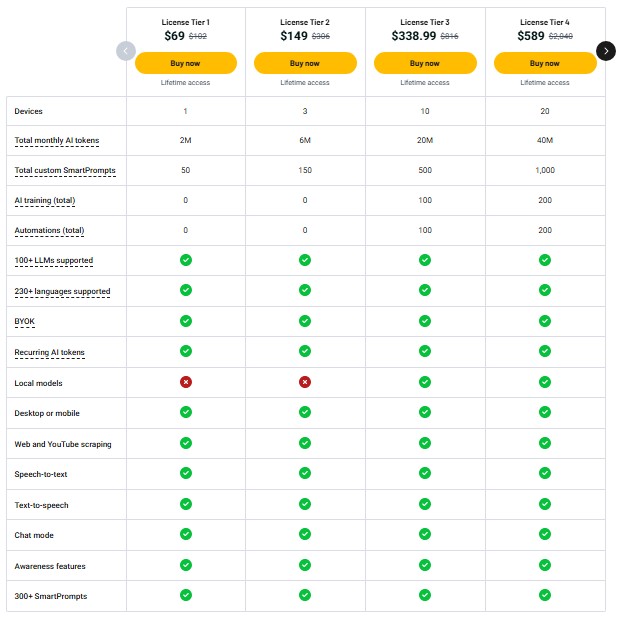
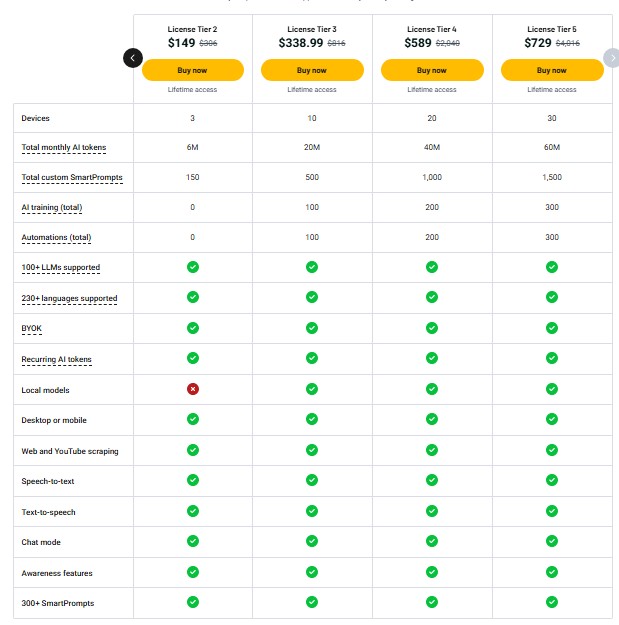
The AppSumo lifetime deal offers four tiers. Here’s what you get with each:
| Feature | Tier 1 | Tier 2 | Tier 3 | Tier 4 |
|---|---|---|---|---|
| Price | $69 | $149 | $339 | $589 |
| Original Price | $102 | $306 | $816 | $2,040 |
| Devices | 1 | 3 | 10 | 20 |
| Monthly Tokens | 2M | 6M | 20M | 40M |
| Custom SmartPrompts | 50 | 150 | 500 | 1,000 |
| AI Training | 0 | 0 | 100 | 200 |
| Automations | 0 | 0 | 100 | 200 |
Tier 1 ($69) – Best for Solopreneurs
Perfect if you’re testing AI tools or work solo. One device and 2M tokens covers basic daily use. You get all core features including local models and 300+ SmartPrompts.
Limitation: No automation features and limited custom prompts.
Tier 2 ($149) – Best for Multi-Device Users
This is my recommended tier for most people. Three devices means you can use it on your laptop, phone, and tablet. The 6M tokens handle heavier usage without running out.
Best for: Content creators, marketers, and consultants who work across devices.
Tier 3 ($339) – Best for Small Teams
Ten devices and 20M tokens work for small teams or power users. You unlock 100 automations and AI training sessions to customize Triplo for specific workflows.
Best for: Agencies, small businesses, or entrepreneurs managing multiple projects.
Tier 4 ($589) – Best for Growing Teams
Twenty devices and 40M tokens support larger teams. With 200 automations, you can build complex workflows. The 1,000 custom SmartPrompts let each team member personalize their setup.
Best for: Growing agencies or teams with diverse AI needs.
Value Comparison
Compare this to competitors:
- Jasper AI: $49/month ($588/year)
- Copy.ai: $49/month ($588/year)
- ChatGPT Plus: $20/month ($240/year)
Triplo’s Tier 2 at $149 pays for itself in about three months. After that, it’s pure savings.
Check Current Triplo AI Pricing on AppSumo
User Interface and Ease of Use
Triplo’s interface is functional but not fancy. Here’s my honest take.
Desktop Experience
The desktop overlay pops up when you press your hotkey. You see a text box, model selector, and SmartPrompts menu. It’s clean but sometimes covers important parts of your screen.
The Control Center is where you manage settings, devices, and integrations. It’s well-organized but packed with options. New users might feel lost at first.
Mobile Experience
The mobile app feels more basic than the desktop version. You can run SmartPrompts, chat with AI, and use voice-to-text. But the interface could be more streamlined.
One annoying limitation: no landscape mode on tablets. This makes it awkward to use on my iPad as a secondary work device.
Keyboard Shortcuts
Hotkeys work great on Mac and Windows. On some Linux distributions, I had inconsistent behavior. Felipe (the founder) is aware and working on fixes.
You can customize shortcuts, which I appreciate. I set mine to Cmd+Shift+Space because it’s easy to press with one hand.
How to Use Triplo AI: Quick Start Guide
Let me walk you through getting started:
Step 1: Download and Install Visit the Triplo AI website and download the app for your operating system. Install it like any other software.
Step 2: Activate Your Device Open the app and sign in with your AppSumo license code. This activates your first device.
Step 3: Choose Your AI Models Go to Settings and select which language models you want to use. Add API keys if you’re using BYOK.
Step 4: Set Up Your Hotkey Pick a keyboard shortcut that doesn’t conflict with other apps. I recommend Cmd+Shift+Space on Mac or Ctrl+Shift+Space on Windows.
Step 5: Try a SmartPrompt Open any app and highlight some text. Press your hotkey, select “Improve Writing” from SmartPrompts, and watch it work.
Step 6: Create a Custom Prompt Click the SmartPrompts menu and select “Create New.” Write instructions for a task you do often, like “Write a professional email response.”
Step 7: Build a Knowledge Base (Optional) Upload relevant documents to create a Mind. This makes AI responses more accurate for your specific work.
Step 8: Set Up Automation (Tier 3+) If you have automation access, connect Triplo to Zapier or Make.com. Build workflows that trigger AI tasks automatically.
5 Best Alternatives to Triplo AI
If Triplo doesn’t fit your needs, consider these options:
1. Copy.ai
Best for: Marketing teams focused on content generation.
Copy.ai specializes in marketing copy with templates for ads, emails, and landing pages. It’s easier to learn but only works in your browser.
Price: $49/month
Pros: Beautiful interface, marketing-focused templates
Cons: No desktop integration, subscription-only
2. Grammarly
Best for: Writers who need grammar and style checking.
Grammarly excels at catching errors and improving clarity. It integrates with many apps but doesn’t offer AI generation like Triplo.
Price: $12/month (Premium)
Pros: Excellent grammar checking, wide integration
Cons: Limited AI generation, expensive for what it does
3. TextExpander
Best for: People who type the same things repeatedly.
TextExpander is a text expansion tool, not true AI. You create shortcuts that expand into full text. It’s simpler but less flexible than Triplo.
Price: $3.33/month
Pros: Simple, reliable, affordable
Cons: No AI intelligence, just templates
4. Jasper AI
Best for: Professional content creators and agencies.
Jasper offers powerful AI writing with brand voice training and SEO tools. It’s more polished than Triplo but costs way more.
Price: $49/month
Pros: High-quality output, team collaboration
Cons: Expensive, browser-only, no local models
5. Voila AI Assistant
Best for: Budget-conscious users who only need ChatGPT.
Voila is another AppSumo deal that brings ChatGPT to your desktop. It’s simpler than Triplo but only uses one AI model.
Price: One-time purchase on AppSumo
Pros: Simple interface, affordable
Cons: ChatGPT only, fewer features
Why Choose Triplo: If you want multi-model support, local AI options, and deep customization, Triplo wins. If you want simplicity and don’t care about advanced features, one of these alternatives might fit better.
Pros and Cons of Triplo AI
Pros
- Works everywhere: No browser limitations or app restrictions
- 100+ AI models: Switch between providers based on your task
- Local AI support: Complete privacy with Ollama and LM Studio
- Lifetime deal value: Pays for itself in 3-6 months vs subscriptions
- Cross-platform: One license works on Mac, Windows, Linux, iOS, Android
- Webhook automation: Connect to Zapier, n8n, Make.com for workflows
- Great support: Felipe and team respond quickly and actually help
- 60-day guarantee: Try it risk-free for two months
Cons
- Steep learning curve: Advanced features take time to master
- Desktop overlay issues: Sometimes blocks important screen areas
- No landscape tablet mode: Awkward on iPad and Android tablets
- Linux keyboard bugs: Inconsistent shortcuts on some distributions
- Complex automation: Not beginner-friendly without technical knowledge
- Mobile app needs polish: Works but feels less refined than desktop
Who Should Buy Triplo AI?
This tool is perfect for:
- Content Creators and Writers: Generate, edit, and improve content without leaving your writing app. Create custom prompts that match your voice.
- Solopreneurs and Consultants: Work across multiple devices and apps seamlessly. Use automation to handle repetitive tasks.
- Small Business Teams: Share AI resources across team members. Build custom SmartPrompts for common business tasks.
- Privacy-Conscious Professionals: Run AI locally for sensitive work. Keep client data secure without sending it to external servers.
- Multi-Platform Users: Switch between Mac, Windows, and Linux without losing functionality. Access the same AI tools on your phone.
- Tech-Savvy Entrepreneurs: Connect Triplo to your existing workflow with webhooks and APIs. Build custom automation that saves hours weekly.
Skip Triplo if you:
- Want plug-and-play simplicity with zero learning curve
- Only work in a browser and don’t need app integration
- Prefer beautiful UI over functionality and customization
- Need enterprise-level admin controls and user management
- Don’t have time to set up and customize the tool
Try Triplo AI Risk-Free for 60 Days
Final Verdict: Should You Buy the Triplo AI Lifetime Deal?
After three weeks of testing, I’m keeping Triplo AI in my daily workflow. It’s not perfect, but the value is undeniable.
The universal app access alone justifies the price. I save at least 30 minutes daily by not switching between AI tools and my work apps. The hotkey activation feels natural after a few days.
The multi-model support means I’m not locked into one AI provider. When GPT-4 is slow, I switch to Claude. When I need privacy, I run local models. This flexibility is rare at this price point.
Is the learning curve steep? Yes. But the YouTube tutorials help, and Felipe’s support team actually responds when you get stuck.
The AppSumo lifetime deal makes this a no-brainer. Tier 2 at $149 is my recommendation for most people. You get three devices, enough tokens for daily use, and all the core features.
Compare that to paying $49/month for Jasper or Copy.ai. Triplo pays for itself in three months, then it’s pure savings.
My Rating: 4.5 out of 5 stars
I recommend buying if: You work across multiple apps, want AI flexibility, and don’t mind spending time learning a powerful tool.
Skip it if: You want something that works perfectly on day one with zero setup.
With the 60-day money-back guarantee, you’ve got nothing to lose. Test it in your real workflow and see if it fits.
The triplo lifetime deal review shows this is one of the better AI tool investments I’ve made this year. It’s not flashy, but it works where I actually need it.