WarmySender Review: Cold Email With Warmup Built In
WarmySender
Disclosure: This post may contain affiliate links. I may earn a commission if you buy through them.
Most cold tools send well but protect poorly. WarmySender leads with warmup and verification before sending.
Rating: 4.5/5 research-based. The unified workflow is strong for the price, with daily caps as the main drag. This WarmySender review breaks down real strengths and limits from 42 buyer reviews, docs, and founder replies.
Quick verdict: Best for agencies and founders who want one login for leads, warmup, and replies. Not ideal for one-off bulk blasts.
- Quick overview and specs
- Key WarmySender features with limits
- Research-based hands-on findings
- Setup, pricing, pros and cons
- 5 alternatives and final verdict
See live AppSumo terms: Check WarmySender lifetime deal
Quick Overview: WarmySender at a Glance
| Fact | Detail |
|---|---|
| Product | WarmySender, cold email with warmup built in |
| Founder | Warmy Sender team, Dubai, UAE, founded 2025 |
| Review basis | Research-based: AppSumo page, docs, 42 buyer reviews |
| Best for | Consultants, agencies, sales managers |
| Key features | A.H.D.E. warmup, Bounce Shield, sequences, 200M leads |
| Integrations | Gmail, HubSpot, LinkedIn, Salesforce, Zapier |
| Lifetime price | $49 to $639 one-time, 60-day refund |
| My rating | 4.5 / 5 research-based |
For tier allowances, read the WarmySender lifetime deal breakdown. It lists every tier side by side.
What Is WarmySender?
WarmySender is a B2B cold outreach platform that keeps deliverability inside the sending workflow. You can search a 200M-contact database, verify addresses, warm mailboxes automatically, and run multi-step sequences from one dashboard.
The goal is simple: fewer bounced emails, fewer spam flags, and more replies without three separate tools. You can import CSVs or Sales Navigator URLs, or build lists from built-in search. Replies land in a unified inbox with opens, clicks, and reply tracking.
Key Features of WarmySender
These are the five features that decide whether this WarmySender review ends positive. Each includes what it does, why it matters, and where it falls short.
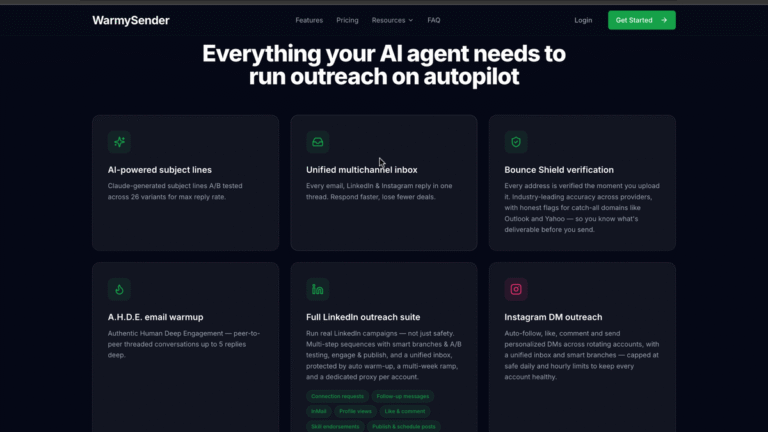
A.H.D.E. warmup with multi-turn threads
Warmup runs automatically once you connect mailboxes, with different strategies for new domains, new inboxes, and dormant addresses. Threads go up to five replies deep, which looks more human than opens alone. It matters because inbox providers trust engagement patterns over time. It falls short when you connect more inboxes than warmup slots, since Tier 4 warms 100 at once out of 500 connected. Practical use: warm new domains two to four weeks before any volume.
Bounce Shield verification before every send
Every address is checked before it enters a sequence, with honest catch-all flagging for Outlook and Yahoo domains. It matters because bounces damage sender reputation within days. It falls short for same-day bulk cleaning because verification carries daily pacing alongside monthly quotas. Practical use: save lists, verify, then let pre-send checks re-check at launch. Included on all tiers.
Sequences with A-Z testing and spam checks
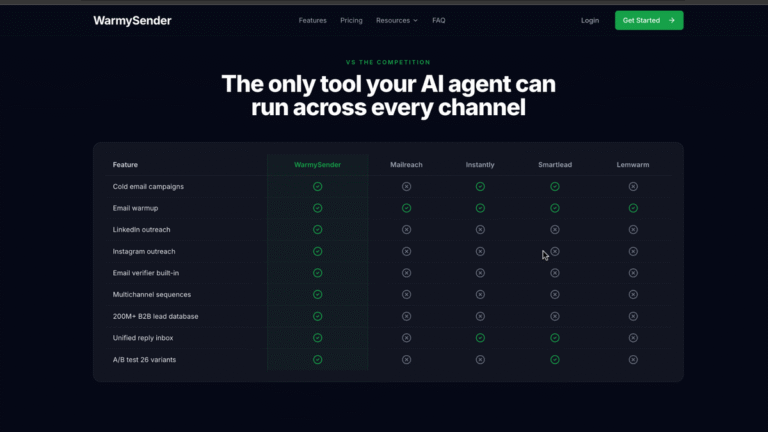
The visual builder supports multi-step flows with eight conditional branch types, mailbox rotation, and smart pacing. A-Z testing runs up to 26 subject and copy variants, and the spam score checker flags risky drafts. It matters because you learn winning angles faster while protecting reputation. It falls short if targeting is weak, since no test fixes a bad ICP. Practical use: three to five steps with two variants per step for 500 prospects.
- Visual builder with 8 branch types
- Up to 26 A-Z variants
- Pre-send spam score checker
- Rotation and pacing built in
200M-contact B2B lead database
Search filters cover titles, industries, and regions, and searching itself is free. Saving uses quota with daily pacing, about 33 per day on Tier 1 and 833 per day on Tier 4. It matters because you can start prospecting without a separate data bill. It falls short for niche coverage and bulk same-day pulls reported by buyers. Practical use: pull tight ICP slices daily, and use lead credits that skip pacing for one-off big pulls.
Unified inbox, analytics, API and MCP
All replies land in one inbox with assignment and thread tracking, while the dashboard shows opens, clicks, and replies per sequence. Custom tracking domains keep links on brand. API and MCP access let AI agents build and launch campaigns from plain English prompts. It matters for speed to lead and fewer logins. It falls short on full CRM revenue attribution, so pair with HubSpot or Salesforce for pipeline reporting.
My Hands-On Experience with WarmySender
This is a research-based review. I did not run live campaigns. I analyzed the AppSumo page, official docs, founder replies, and all 42 buyer reviews to find repeat patterns.
Three patterns repeat. Warmup setup earns consistent praise for strategy choice and reporting depth. Lead saving pace draws the most complaints, with buyers quoting 33 per day on Tier 1. Founder support replies are unusually detailed, including docs links and permanent fixes like saved filters. That matches a young but responsive team shipping fast.
User Interface and Ease of Use
Setup flows in order: connect mailboxes, set tracking domain, warm up, then build lists and sequences. Gmail and Workspace need app passwords, while Microsoft 365 uses OAuth. That difference trips up first-time Google users, so prepare passwords before connecting ten inboxes.
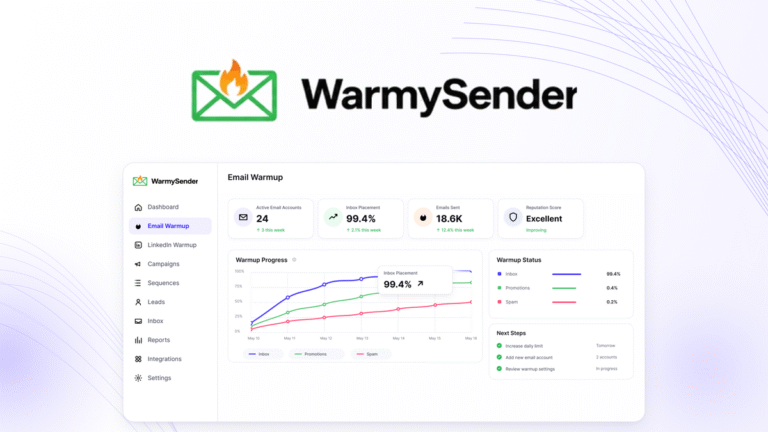
The dashboard keeps warmup stats beside campaign results, which helps spot problem mailboxes early. Saved filters now exist after buyer requests. For sending-side cost context, see Emailit LTD pricing explained.
How to Use WarmySender
- Claim your tier on AppSumo and apply the license inside your WarmySender account. Open your AppSumo receipt, copy the redemption link or code, and connect it to a fresh WarmySender workspace. Success looks like your plan limits showing correctly before you connect any inbox.
- Connect one to three sending inboxes and start warmup before any campaign. For Gmail and Workspace create app passwords first, while Microsoft 365 connects through OAuth in a few clicks. Pick the warmup strategy that matches new domains or dormant inboxes, then let reputation build for two to four weeks.
- Set a custom tracking domain so campaign links reflect your brand. Add the DNS records WarmySender shows, wait for verification to turn green, and set it as default for all sequences. This step protects click trust and keeps deliverability stable when you later raise volume.
- Build a tight prospect list of 200 to 500 ICP leads and verify every address. Search the 200M database with narrow title and industry filters, or import a CSV or Sales Navigator URL for control. Run Email Verifier first and drop risky catch-alls, since clean data decides inbox placement more than copy tweaks.
- Draft a three to five step sequence, check the pre-send spam score, and launch with two variants. Write one clear offer per step, test two subject angles, and keep daily sends low while warmup matures. A clean spam score plus verified list means your first replies reflect message fit, not technical issues.
- Work replies in the unified inbox daily and scale warmed volume slowly. Answer hot leads within one business day, tag objections and referrals, and move unsubscribes out immediately. Once reply rates hold steady for a week, add more warmed inboxes before raising sends per inbox.
WarmySender Lifetime Deal Pricing
| Tier | One-time | Emails | Leads | Verifications | Warmed inboxes |
|---|---|---|---|---|---|
| Tier 1 | $49 | 10,000 | 1,000 | 800 | 10 |
| Tier 2 | $119 | 25,000 | 3,000 | 1,200 | 25 |
| Tier 3 | $229 | 50,000 | 10,000 | 2,000 | 50 |
| Tier 4 | $399 | 100,000 | 25,000 | 12,000 | 100 |
Prices come only from the AppSumo LTD page. Warmysender.com lists no public monthly prices, so break-even runs against a typical $49 monthly stack at one to three months by tier. Add-ons run $59 per 5,000 monthly leads or verifications and are non-refundable.
Pros and Cons of WarmySender
- Warmup, verification, and sending in one tool
- Strong warmup reporting and strategy choice
- 26-variant testing with branch logic
- Unified inbox with campaign analytics
- MCP and API included on all tiers
- Fast, detailed founder support
- Daily caps slow large list builds
- Google setup needs app passwords
- Database depth varies by niche
- Multichannel add-ons cost extra
5 Alternatives to WarmySender
1. Instantly
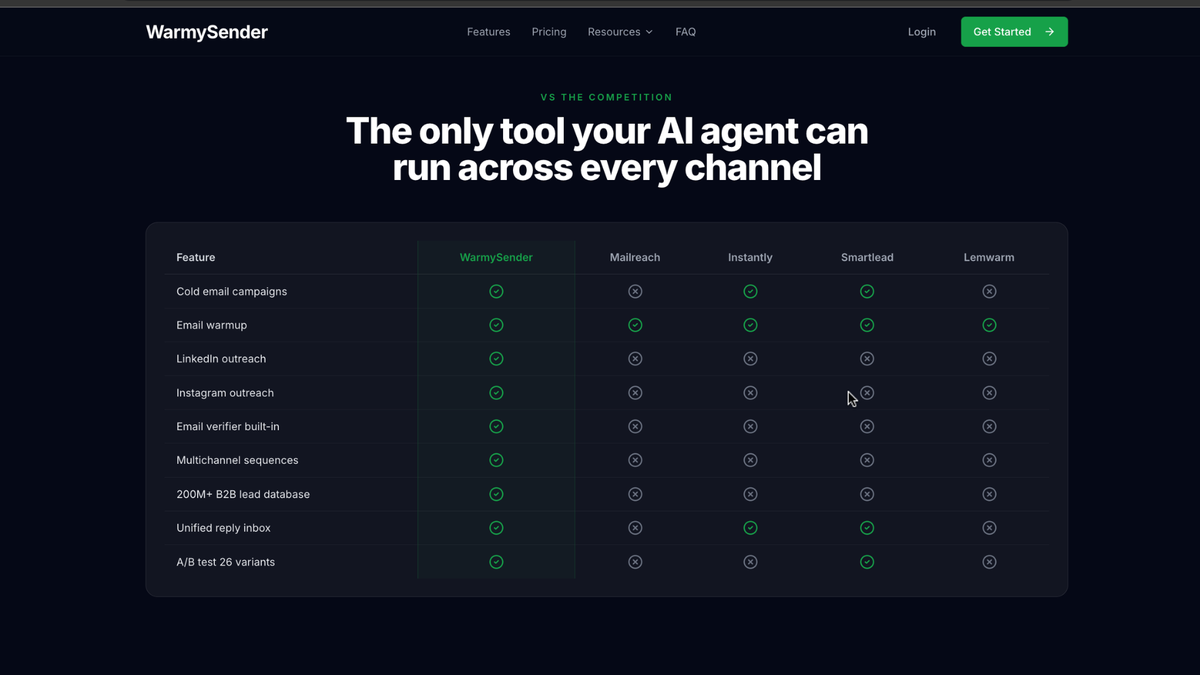
Instantly does high-volume sending best, with warmup, rotation, lead finder, and analytics. Key features include deliverability network, automated warmup, and fast list handling. Pricing is monthly and scales with volume. Bottom line: pick Instantly when WarmySender daily pacing blocks your scale.
2. Lemlist
Lemlist does creative personalization best, with custom images, video steps, and multichannel flows. Key features include lemwarm, AI sequences, and LinkedIn steps. Pricing is monthly per seat at premium rates. Bottom line: pick Lemlist for reply quality over raw volume. Compare: WarmySender vs Lemlist.
3. Smartlead
Smartlead does agency inbox scale best, with unlimited mailboxes, rotation, warmup, and white-label controls. Key features include sub-accounts and deliverability reporting. Pricing is monthly by plan. Bottom line: pick Smartlead when inbox counts exceed WarmySender warmed slots.
4. Hunter.io
Hunter.io finds and verifies professional emails fastest, with domain search and bulk tasks. Key features include finder, verifier, and light campaigns. Pricing is freemium with paid credit plans. Bottom line: use Hunter.io to source emails, then send through WarmySender.
5. Lusha
Lusha covers B2B data depth best, with direct dials, firmographics, and CRM sync. Key features include prospecting filters and intent signals. Pricing is monthly per credit seat. Bottom line: add Lusha when WarmySender data lacks your niche. More options: WarmySender alternatives compared.
Who Should Use WarmySender?
Agencies, consultants, and sales managers sending weekly gain most, especially teams wanting one bill for safety plus sending. The WarmySender lifetime deal locks that value with 60-day cover. Skip if you send rarely, need instant 10,000-lead exports, or live on LinkedIn. See Emailit alternatives for deliverability.
Final Verdict: Is the WarmySender Lifetime Deal Worth It?
Yes for steady cold senders who value safety built in. Daily pacing and warmup slot math keep this WarmySender review at 4.5 rather than 5, but dollars per capability remain high. Check the WarmySender lifetime deal, start with warmup first, and test Tier 1 inside the refund window.
WarmySender FAQs
Does WarmySender warm up email automatically?
Yes. Warmup runs on its own once you connect mailboxes. It uses multi-turn threads and pacing to build reputation, with stats shown in the dashboard daily.
Can beginners run cold email with WarmySender?
Yes, if you follow warmup first. Connect inboxes, verify lists, start with small volume, and use spam checks. Support docs walk through each step clearly.
How accurate is the B2B lead database?
Accuracy varies by niche and region. Filters look solid, but always verify before sending. Searching is free, so test your ICP volume before committing.
Does WarmySender support team workspaces?
Yes. Tier 2 and higher add workspaces and members. Tier 4 gives 5 workspaces and 5 members for agencies splitting clients cleanly.
Is there an API for custom workflows?
Yes. API access is included on all lifetime tiers. You can also connect MCP-compatible AI agents to build and run campaigns in plain language.
What mailbox providers work best?
Gmail, Workspace, Microsoft 365, and Outlook all work. Gmail needs app passwords, Microsoft uses OAuth. Warm new domains for several weeks first.