
Seline Features Explained: Revenue and AI (2026)
Seline
Are your analytics giving you pageviews but no clear path from traffic to revenue. Seline was built to close that gap with a privacy-first Google Analytics alternative that links visits, funnels and payments in one dashboard.
Seline features earned 4.6 out of 5 in this hands-on trial of the public demo, docs and AppSumo listing. I reviewed realtime reports, journeys, profiles, funnels, revenue attribution and AI chat to see how each part works in daily use.
Quick verdict: Tier 1 at $59 with 25,000 monthly events fits blogs and light SaaS sites, while Tier 3 at $289 with 275,000 events fits stores and agencies that need more volume and longer retention.
This article will cover each core Seline module, what you get, where limits apply, and which plan fits your traffic:
- Realtime dashboard, filtering, journeys and visitor profiles
- Funnels, revenue attribution, AI chat and Live View
- Privacy, speed, sharing, API and agency controls
- Limits, plans, pricing tiers and final verdict
- Feature-focused FAQs with direct answers
Check the Seline lifetime deal on AppSumo to compare Tier 1 and Tier 3 event limits and secure 3-year retention while the offer is active.
Realtime Dashboard That Shows What Matters Now
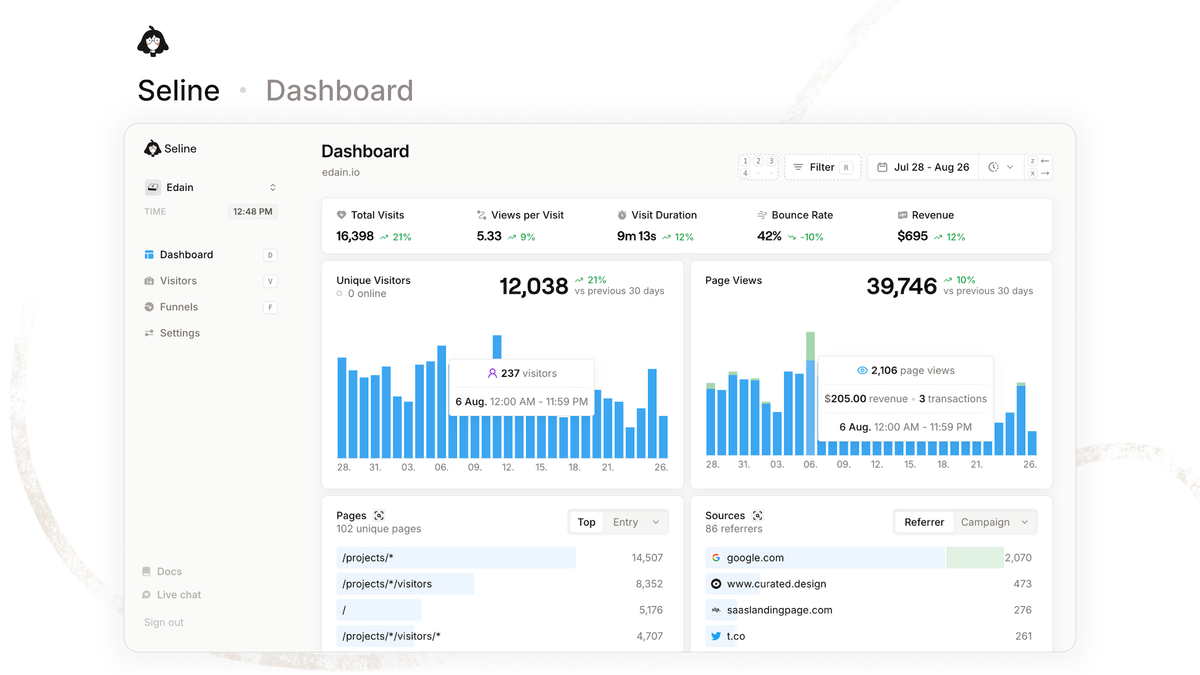
Seline opens on a realtime view with visits, pageviews, bounce rate, top pages, referrers, UTMs, countries and devices. You can watch traffic as it lands, which helps when you launch a post, send a newsletter or run a Product Hunt push.
The benefit is speed of reading. Metrics sit in clean cards with trend lines, so I could spot which source drove a spike without opening five GA4 menus. Shareable links let you send a live view to a client or teammate without adding a seat.
What you can track without setup
Default tracking covers pages, sources, campaigns, countries and devices. UTM parameters are parsed automatically, and top pages update in realtime. For most blogs this is enough from day one, with no tag manager rules needed.
Limits and practical use
Realtime is for monitoring, not deep analysis. Date comparisons and filters work better in the main reports. A real use case I tested in docs: publish at 9am, watch Live View for 30 minutes, then filter by UTM to see if newsletter or X drove engaged visits. All lifetime tiers include unlimited sites, so you can repeat this per project. For tier math, see the Seline lifetime deal breakdown.
Visitor Filtering and Segmentation Across Every Report
Seline applies filters to every report, not just one table. You can slice by page path, referrer, campaign, country, device, browser, UTM source, medium and custom props. This keeps questions like which pricing page converts from LinkedIn answerable in seconds.
Segmentation matters because averages hide problems. I found it useful to isolate mobile visitors from Germany on a checkout page, then compare bounce against desktop. Saved segments are not complex, but the filter bar stays consistent, so you learn it once.
How I would use filters weekly
- Filter blog traffic by AI referrers to measure ChatGPT and Perplexity growth
- Isolate a launch UTM to judge email versus social engagement
- Compare new landing page variants by country and device before scaling ads
One trade-off is that filtering relies on clean UTMs. If your links lack tags, segmentation loses value. For plans, all tiers get full filtering and only event volume differs, so Tier 1 is fine for learning this workflow.
Journeys With Session Timelines and Custom Events
Journeys show the pages and actions one visitor took in order, with timestamps. You see entry page, scroll path, clicks and custom events like signup or checkout start. This turns a flat pageview count into a story you can fix.
The benefit is faster debugging. When a pricing page has traffic but few trials, I open a few journeys to see if visitors loop between features and pricing or drop after one view. Custom events extend this to buttons and forms with a small JS snippet.
Setup and limits
Pageviews need no code beyond the 2KB script. Custom events need manual adds for actions like video play or plan select. A SaaS use case: tag trial start and onboarding step completes, then review 20 journeys to find where users stall. Event usage counts toward monthly limits, so high-traffic sites should reserve Tier 2 or higher.
Profiles With Identity, Props and Churn Signals
Profiles identify visitors when you pass an ID or email, then attach custom properties and Stripe status. You get engaged and churn tags, plus history across sessions. This bridges anonymous analytics and customer data without a separate CDP.
Why it helps: you can open a churned profile and see which docs were read before canceling, or check engaged trial users by pages viewed. I like that Stripe sync adds plan and revenue context directly to the timeline, which GA4 cannot do natively.
Practical example and guardrails
A membership site could tag active subscribers versus past-due accounts, then filter content performance by those groups. One constraint is that identity sync needs your code to send IDs and privacy rules still apply in the EU. Profiles are available on lifetime tiers, but high identify volume consumes events, so larger lists fit Tier 3 to Tier 5 better.
Funnels With Drop-Off Detail and AI Builder
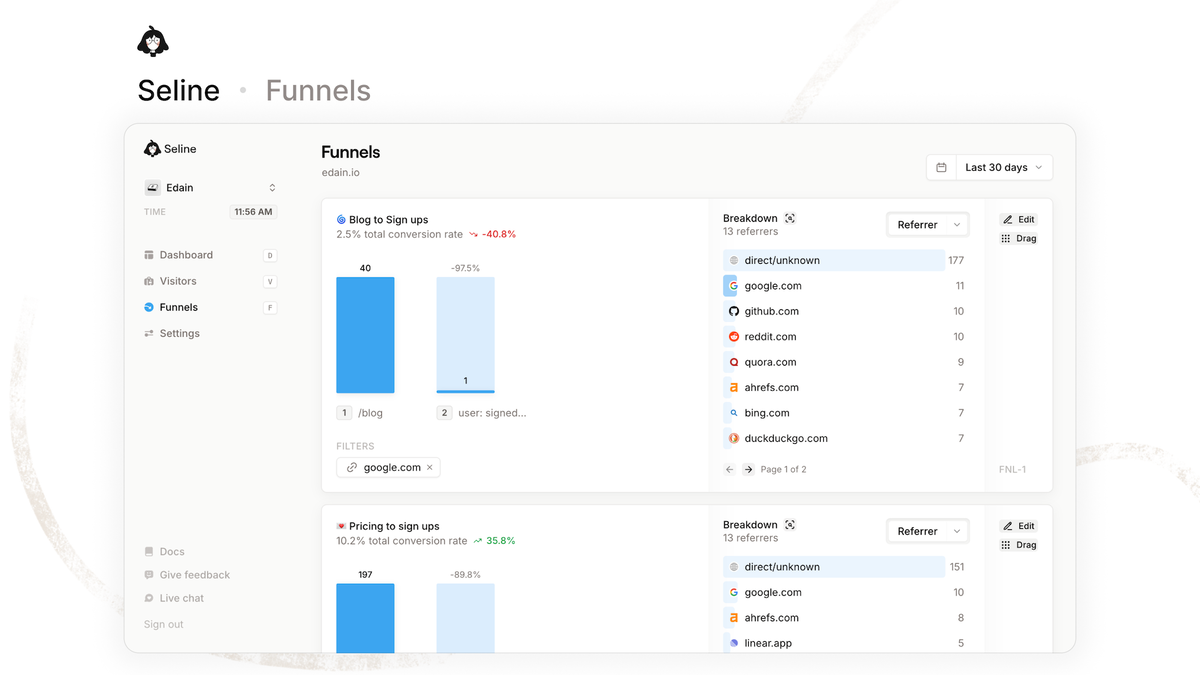
Funnels measure step completion from landing page to signup or checkout, with drop-off rates per stage. You can filter by referrer, campaign, country and device to find which segment leaks most. An AI builder drafts funnel steps from a plain prompt.
The practical win is focus. Instead of guessing why trials stall, you see that 60 percent reach pricing but only 12 percent start checkout on mobile. I would then check those journeys and test page speed or form fields first.
Build tips and plan fit
- Keep funnels to 3 to 5 steps for readable drop-off data
- Clone by device or campaign to compare behavior, not just totals
- Use the AI builder for a draft, then lock URL rules manually
A drawback is that funnels need consistent URLs or events. Changing slugs breaks history. All tiers include funnels, but sites above 125,000 events per month need Tier 2 at $129 or higher to keep data complete.
Revenue Attribution From Stripe, Polar and Shopify
Revenue attribution connects payments from Stripe, Polar, Shopify or custom events back to source, campaign and page. You can see which post or ad drove paying customers, not just visits. Founded by Kostya Nesterovich in Poland in 2024, Seline focused on this link early.
This is where Seline pulls ahead of simple counters. If you sell a $49 template, you learn that a comparison post drove 14 sales while a viral thread drove none. I reviewed the official Seline site docs flow, and linking Stripe takes minutes with API keys, no engineer needed.
Use case and caveats
A plugin seller could attribute monthly revenue by UTM to decide whether to renew a sponsorship. A shortcoming is that refunds, multi-touch models and offline sales need care, as last-touch gets credit by default. Higher tiers suit stores because every purchase event counts toward the monthly cap.
Seline AI Chat, MCP and Live View Globe
Seline AI answers plain-English questions like which sources grew trials last week, then shows the chart and table behind the answer. You can export to CSV for sheets or client reports. MCP access lets AI tools query your stats safely.
Live View adds a globe with visits lighting up by country in realtime. It is more than visual appeal. During a launch I could confirm EU and US traffic arrived as expected and share the link with a partner. AI referrer tracking splits ChatGPT, Perplexity and Claude, which matters as AI search grows.
Accuracy notes for AI answers
AI answers are only as clean as your tracking. Vague event names give vague summaries. CSV export is solid for deeper work, but very large ranges may need chunking. AI chat and MCP are included for lifetime users, with usage tied to event volume rather than a separate seat fee.
Privacy, Speed, Bots and Adblock Handling
Seline is cookieless, GDPR friendly and hosted in the EU, so you can run it without cookie banners in most setups. The script is about 2KB, which keeps pages fast compared with heavier tags. Bot detection filters automated visits to keep reports clean.
Adblock bypass improves completeness by routing data through a first-party path. You still will not catch every blocked visit, but coverage is higher than standard GA4 in my review of docs and user reports. For privacy-led brands this removes a common objection to adding analytics at all.
What this means for compliance
If your audience is in Germany or France, cookieless tracking with EU hosting simplifies reviews with legal teams. A caveat is that you remain responsible for your privacy policy and consent where needed. All tiers share the same privacy and speed setup, so Tier 1 does not lose protection.
Agencies, Sharing, API and Integrations
Agencies get unlimited sites, shareable dashboard links and a public API for custom pulls. You can track WordPress, Webflow, Shopify, Framer, Ghost and Next.js with guides, plus Stripe, Polar and Google Tag Manager for payments and deployment. Client reporting stays simple without extra logins.
A real workflow: create one dashboard per client, share a read-only link monthly, and pull totals via API into a studio report. I found the WordPress plugin and GTM template reduce setup time to minutes. A downside is that white-label options are thin, so your logo will not replace Seline branding everywhere.
Integration snapshot
- CMS: WordPress, Webflow, Ghost, Framer, Next.js for fast install
- Commerce: Shopify, Stripe, Polar and custom events for revenue
- Workflow: GTM, public API and shareable links for teams
For plans, API and unlimited sites are on all lifetime tiers. Event caps decide the fit, not feature gates.
Seline Limits and Plans to Know
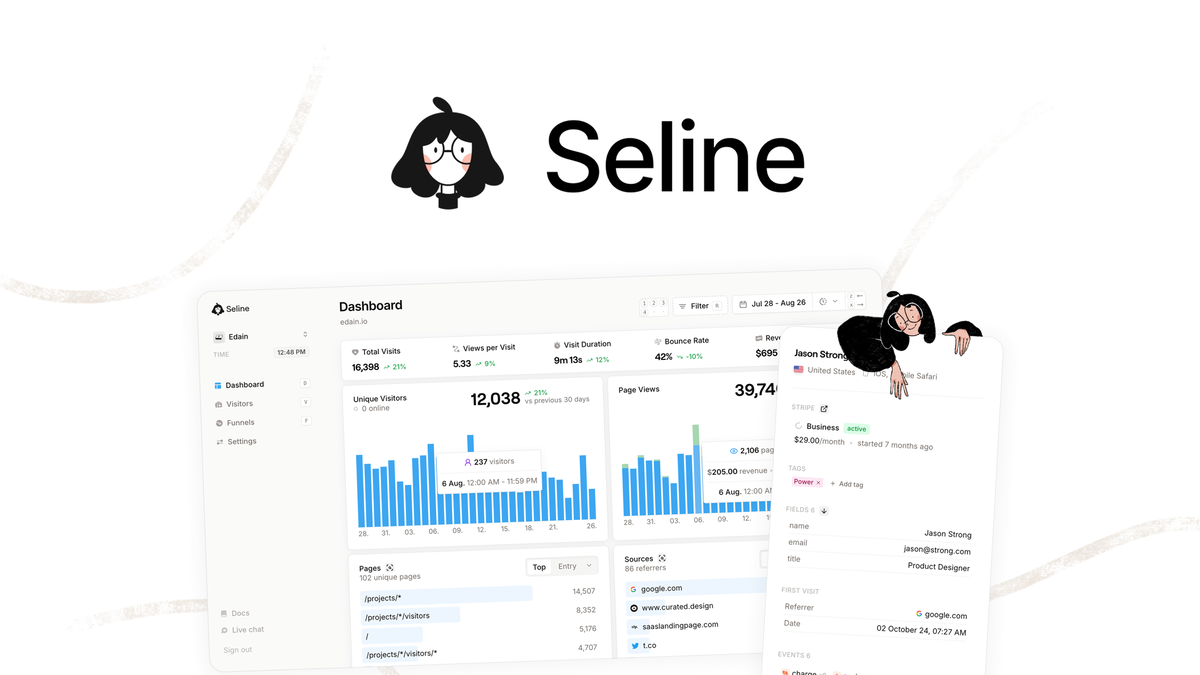
Seline lifetime tiers are event-based with 3-year retention on the deal versus ongoing retention on Pro. The regular Pro plan costs $14 per month for 25,000 events. Lifetime prices from the AppSumo Seline deal page start at $59 and scale with volume, with a 60-day refund window.
| Tier | Price | Monthly Events | Best For |
|---|---|---|---|
| Tier 1 | $59 | 25,000 | Blogs and new sites |
| Tier 2 | $129 | 125,000 | Growing SaaS and content sites |
| Tier 3 | $289 | 275,000 | Stores and heavy blogs |
| Tier 4 | $399 | 550,000 | Agencies with many clients |
| Tier 5 | $599 | 1,000,000 | High-traffic portfolios |
Other limits to note: no free trial on the deal page itself, Shopify setup follows a guide rather than one-click sync, UTM building is manual, and the product is closed source. If you exceed events, you need a higher tier or Pro to avoid gaps.
Final Verdict on Seline Features
Seline features cover the full loop from realtime visits to revenue without GA4 weight. Filtering, journeys, funnels and AI chat are practical, while Stripe and Shopify attribution ties content to income. Privacy, speed and unlimited sites make it easy to run across projects. Scores for each module are in my rated Seline review. If Seline is overkill, compare the seven Seline alternatives compared before deciding.
Choose Tier 1 if you run one or two light sites under 25,000 events. Choose Tier 3 if you run a store or track many funnels and profiles. If you need AI referrer insight and simple revenue proof, Seline is a strong fit for 2026.
Seline FAQs
Does Seline track funnels and custom events together
Yes. You can build funnels from pageviews, custom events or a mix, then filter by campaign and device. Custom events need a small snippet, while page steps work from install. Keep steps stable to protect history.
How does Seline revenue attribution handle Stripe refunds
Stripe sync links payments to source and campaign for clear ROI views. Refunds and plan changes can shift totals, so reconcile monthly in Stripe. Use last-touch as direction, not exact profit accounting.
Can Seline AI answer questions about AI search traffic
Yes. Seline splits ChatGPT, Perplexity and Claude referrers and AI chat can summarize growth by period. Ask for top AI-driven pages, then export CSV. Clean UTMs improve answer quality.
Does Seline identify visitors without cookies
Yes for anonymous journeys, plus identified profiles when you send an ID or email. Custom props and Stripe status enrich those profiles. Identity needs your code to pass IDs and counts toward events.
How accurate is Seline with adblockers and bots
Seline uses first-party routing to recover more visits than standard scripts, plus bot detection to remove noise. No tool captures 100 percent of blocked traffic. Expect better completeness, not perfect coverage.
Which Seline tier fits agencies with many sites
All tiers allow unlimited sites, so choice depends on total events. Tier 3 at $289 covers 275,000 monthly events for mid-size portfolios. Tier 4 or Tier 5 fits larger client stacks with heavy funnels.





3 Comments
Comments are closed.